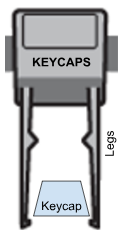
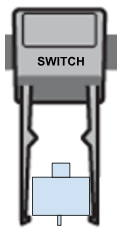
The feet on your G512 X keyboard are designed to be used as both switch and keycaps pullers. The differences are the width between legs and the design of the edges of the legs.
Use the foot labelled KEYCAPS to remove the keycap from your G512 X.
- Gently insert the legs under the keycap, aligning either right/left (horizontally) or top/bottom (vertically).
- Apply pressure gently, till you hear it locking.
- Gently hold and pull the keycap to remove it from the keyboard.
Use the foot labelled SWITCH to remove a switch from your G512 X.
- After removing the keycap, gently insert the legs under the switch, aligning either top/bottom (vertically).
- Grab the switch firmly, as the legs get locked at the bottom of the switch.
- Gently pull the switch to remove it from the keyboard.
- While attaching the switch back to the keyboard, make sure the contacts/terminals are correctly aligned with the keyboard.
Important Notice: The Firmware Update Tool is no longer supported or maintained by Logitech. We highly recommend using Logi Options+ for your supported Logitech devices. We are here to assist you during this transition.
Important Notice: The Logitech Preference Manager is no longer supported or maintained by Logitech. We highly recommend using Logi Options+ for your supported Logitech devices. We are here to assist you during this transition.
Important Notice: The Logitech Control Center is no longer supported or maintained by Logitech. We highly recommend using Logi Options+ for your supported Logitech devices. We are here to assist you during this transition.
Important Notice: The Logitech Connection Utility is no longer supported or maintained by Logitech. We highly recommend using Logi Options+ for your supported Logitech devices. We are here to assist you during this transition.
Important Notice: The Unifying Software is no longer supported or maintained by Logitech. We highly recommend using Logi Options+ for your supported Logitech devices. We are here to assist you during this transition.
Important Notice: The SetPoint software is no longer supported or maintained by Logitech. We highly recommend using Logi Options+ for your supported Logitech devices. We are here to assist you during this transition.
Frequently Asked Questions
There are no products available for this section
There are no Downloads for this Product
There are no Downloads for this Version
Compatible Product
