If your video doesn’t appear the way you expect try the following steps:
- Download Logitech’s free Tune software available for Mac and Windows. Tune lets you check for and update to the latest firmware. If available, newer firmware will enhance your webcam in multiple ways, including video performance.
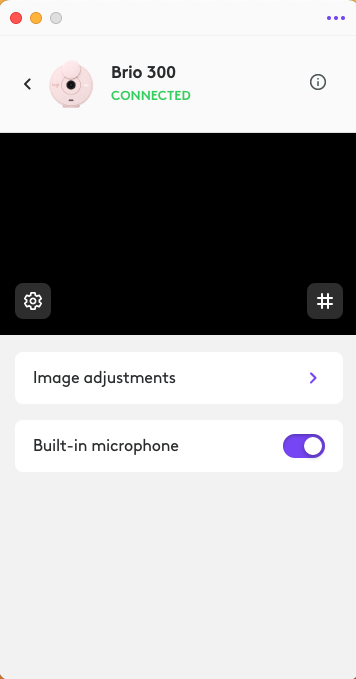
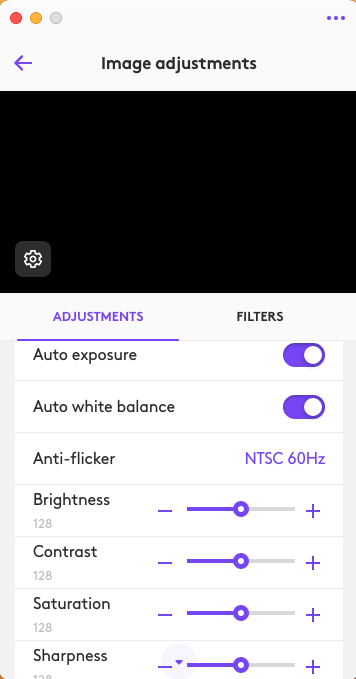
- Use the Tune software to adjust the camera image. Using the software, you can modify image brightness, contrast, saturation, and sharpness. Additionally you can disable auto-white balance and auto-exposure if you want to.
- If the first two steps don’t resolve the issue, another option is to introduce more light in front of you, either natural or artificial. This will generally improve your appearance on video. You can also try sitting closer to the camera — try 30 inches and adjust closer or further to see what works best.
Important Notice: The Firmware Update Tool is no longer supported or maintained by Logitech. We highly recommend using Logi Options+ for your supported Logitech devices. We are here to assist you during this transition.
Important Notice: The Logitech Preference Manager is no longer supported or maintained by Logitech. We highly recommend using Logi Options+ for your supported Logitech devices. We are here to assist you during this transition.
Important Notice: The Logitech Control Center is no longer supported or maintained by Logitech. We highly recommend using Logi Options+ for your supported Logitech devices. We are here to assist you during this transition.
Important Notice: The Logitech Connection Utility is no longer supported or maintained by Logitech. We highly recommend using Logi Options+ for your supported Logitech devices. We are here to assist you during this transition.
Important Notice: The Unifying Software is no longer supported or maintained by Logitech. We highly recommend using Logi Options+ for your supported Logitech devices. We are here to assist you during this transition.
Important Notice: The SetPoint software is no longer supported or maintained by Logitech. We highly recommend using Logi Options+ for your supported Logitech devices. We are here to assist you during this transition.
Frequently Asked Questions
There are no products available for this section
There are no Downloads for this Product
There are no Downloads for this Version
Compatible Product
