Once you’ve created Smart Actions, you will be able to access them using the Manage tab. All the Smart Actions created will live here, including ones that are still in draft mode.
Draft Smart Actions are actions which are not set up correctly because they are missing an application with the actions:
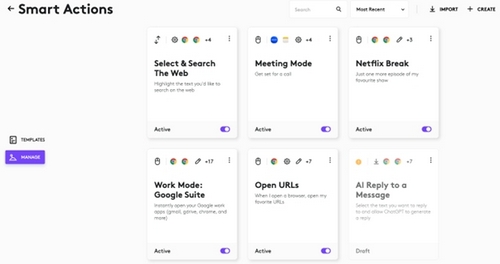
Updating Smart Actions:
Use the context menu on the top right corner of the Smart Actions card. There are four options: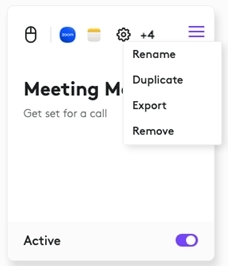
- Rename the Smart Action — change the name and the description
- Add label - makes it easier to filter Smart Actions
- Duplicate creates a copy of current Smart Actions
- Export lets you save your Smart Actions as a .json file. You can share this file with your colleagues and friends, so that they can use Smart Actions that you have created
- Remove lets you permanently delete your Smart Actions from your list
Use the Active toggle on the bottom of the card to turn off the Actions. Smart Actions are active by default — they are executed as soon as you trigger them.
Aviso importante: Logitech ya no ofrece asistencia ni mantenimiento para Firmware Update Tool. Recomendamos encarecidamente el uso de Logi Options+ para los dispositivos Logitech compatibles. Estamos aquí para ayudarte durante esta transición.
Aviso importante: Logitech ya no ofrece asistencia ni mantenimiento para Logitech Preference Manager. Recomendamos encarecidamente el uso de Logi Options+ para los dispositivos Logitech compatibles. Estamos aquí para ayudarte durante esta transición.
Aviso importante: Logitech ya no ofrece asistencia ni mantenimiento para Logitech Control Center. Recomendamos encarecidamente el uso de Logi Options+ para los dispositivos Logitech compatibles. Estamos aquí para ayudarte durante esta transición.
Aviso importante: Logitech ya no ofrece asistencia ni mantenimiento para Logitech Connection Utility. Recomendamos encarecidamente el uso de Logi Options+ para los dispositivos Logitech compatibles. Estamos aquí para ayudarte durante esta transición.
Aviso importante: Logitech ya no ofrece asistencia ni mantenimiento para el software Unifying. Recomendamos encarecidamente el uso de Logi Options+ para los dispositivos Logitech compatibles. Estamos aquí para ayudarte durante esta transición.
Aviso importante: Logitech ya no ofrece asistencia ni mantenimiento para el software SetPoint. Recomendamos encarecidamente el uso de Logi Options+ para los dispositivos Logitech compatibles. Estamos aquí para ayudarte durante esta transición.
Preguntas más frecuentes
No hay productos disponibles para esta sección
No hay descargas para este producto
No hay descargas para esta versión.
Compatible Product
