If haptic feedback isn't working on your MX Master 4, check the following:
- Make sure you're using the latest version of Windows 11 that supports haptics (March 2026 release and later).
- Check that the latest firmware version of MX Master 4 is installed.
- If you're using a Logi Bolt receiver to connect your device, the receiver should also be on the latest firmware.
For more information on the MX Master 4 Firmware Update, please see:
- Background Device Firmware Update (DFU) - MX Master 4
- Troubleshoot the Background Device Firmware Update
If you're using a Logi Bolt receiver, use the following steps to update the Bolt firmware:
- Plug in your Logi Bolt receiver.
IMPORTANT: The receiver must remain connected throughout the process. Avoid interruptions. - Make sure your MX Master 4 is paired with the receiver.
- Open the Logi Options+ app and click Settings.
-
In the General Settings window, click CHECK FOR UPDATE.
You’ll be notified if an update is available.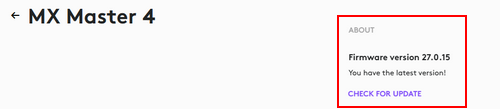
- Follow the on-screen prompts to apply the updates.
Aviso importante: Logitech ya no ofrece asistencia ni mantenimiento para Firmware Update Tool. Recomendamos encarecidamente el uso de Logi Options+ para los dispositivos Logitech compatibles. Estamos aquí para ayudarte durante esta transición.
Aviso importante: Logitech ya no ofrece asistencia ni mantenimiento para Logitech Preference Manager. Recomendamos encarecidamente el uso de Logi Options+ para los dispositivos Logitech compatibles. Estamos aquí para ayudarte durante esta transición.
Aviso importante: Logitech ya no ofrece asistencia ni mantenimiento para Logitech Control Center. Recomendamos encarecidamente el uso de Logi Options+ para los dispositivos Logitech compatibles. Estamos aquí para ayudarte durante esta transición.
Aviso importante: Logitech ya no ofrece asistencia ni mantenimiento para Logitech Connection Utility. Recomendamos encarecidamente el uso de Logi Options+ para los dispositivos Logitech compatibles. Estamos aquí para ayudarte durante esta transición.
Aviso importante: Logitech ya no ofrece asistencia ni mantenimiento para el software Unifying. Recomendamos encarecidamente el uso de Logi Options+ para los dispositivos Logitech compatibles. Estamos aquí para ayudarte durante esta transición.
Aviso importante: Logitech ya no ofrece asistencia ni mantenimiento para el software SetPoint. Recomendamos encarecidamente el uso de Logi Options+ para los dispositivos Logitech compatibles. Estamos aquí para ayudarte durante esta transición.
Preguntas más frecuentes
No hay productos disponibles para esta sección
No hay descargas para este producto
No hay descargas para esta versión.
Compatible Product
