Gestures
Gesture controls let the touchpad turn specific hand movements into interactions with your computer. From clicking or scrolling up and down, to swiping between windows or apps.
If you’re a Mac user, you’ll need to download the Logi Options+ app to unlock some gestures that will feel familiar to what you’re used to.
Click on the link for your operating system to find the complete gesture suite:
Cursor Speed
You can change the speed and accuracy of your cursor for optimal control on Logi Options+ or on the native settings of your laptop.
To use Logi Options+
- Select Casa Touch on Logi Options+.
- Go to tthe Point and Click section.
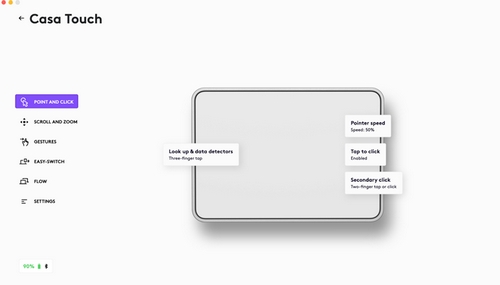
- Adjust the Pointer speed slider to the speed you want. Left is slower and right is faster.
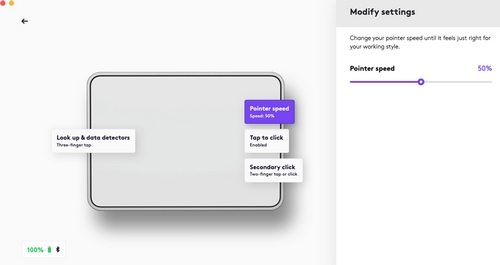
To use Native settings
-
Windows:
Open Settings > click Bluetooth & Devices. On the right, click on Touchpad. Adjust the Cursor Speed to the speed you want. - macOS: Open Settings > click on Mouse. Adjust the Tracking Speed to the speed you want. NOTE: Setting the tracking speed using Trackpad native settings won't adjust the speed of Casa Touch. Be sure to use Mouse when setting the tracking speed for your Casa Touch.
- ChromeOS: Open Settings > Click on Device. Select Mouse and touchpad or Touchpad. Adjust the Touchpad Speed to the speed you want.
- iPadOS: Open Settings > click on General. Select Trackpad & Mouse and adjust the Tracking Speed to the speed you want.
Aviso importante: Logitech ya no ofrece asistencia ni mantenimiento para la herramienta de actualización de firmware. Le recomendamos usar Logi Options+ para poner al día sus dispositivos Logitech compatibles. Estamos aquí para ayudarle durante esta transición.
Aviso importante: Logitech ya no ofrece asistencia ni mantenimiento para Logitech Preference Manager. Le recomendamos usar Logi Options+ para poner al día sus dispositivos Logitech compatibles. Estamos aquí para ayudarle durante esta transición.
Aviso importante: Logitech ya no ofrece asistencia ni mantenimiento para Logitech Control Center. Le recomendamos usar Logi Options+ para poner al día sus dispositivos Logitech compatibles. Estamos aquí para ayudarle durante esta transición.
Aviso importante: Logitech ya no ofrece asistencia ni mantenimiento para Logitech Connection Utility. Le recomendamos usar Logi Options+ para poner al día sus dispositivos Logitech compatibles. Estamos aquí para ayudarle durante esta transición.
Aviso importante: Logitech ya no ofrece asistencia ni mantenimiento para el software Unifying. Le recomendamos usar Logi Options+ para poner al día sus dispositivos Logitech compatibles. Estamos aquí para ayudarle durante esta transición.
Aviso importante: Logitech ya no ofrece asistencia ni mantenimiento para el software SetPoint. Le recomendamos usar Logi Options+ para poner al día sus dispositivos Logitech compatibles. Estamos aquí para ayudarle durante esta transición.
Preguntas más frecuentes
No hay productos disponibles para esta sección
No hay descargas para este producto
No hay descargas para esta versión.
Compatible Product
