Yes, your Tarah Pro earbuds will turn off automatically when they are connected to your Bluetooth® audio device and have been in an idle state for 15 minutes (i.e.not playing music or in a phone call).
Your Tarah Pro will also turn off, after 15 minutes, if not connected to your Bluetooth audio device.
When the earbuds are snapped together they disconnect from your audio device and re-connect when you pull the earbuds apart. If the earbuds are left snapped together for 15 minutes or more, the earbuds will power off.
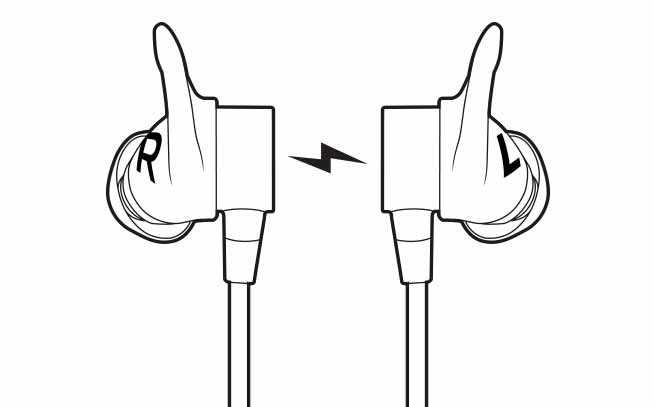
This feature helps conserve the earbuds battery when you are not actively using your earbuds.
To re-connect your earbuds after they have turned off:
- Make sure Bluetooth on your audio device is on.
- Press and hold the middle button on the inline remote until you hear an ascending “Power on” tone and the LED turns solid white.
- Once your Tarah Pro earbuds have connected to your audio device you will hear the “Connected” voice prompt.
Aviso importante: Logitech ya no ofrece asistencia ni mantenimiento para la herramienta de actualización de firmware. Le recomendamos usar Logi Options+ para poner al día sus dispositivos Logitech compatibles. Estamos aquí para ayudarle durante esta transición.
Aviso importante: Logitech ya no ofrece asistencia ni mantenimiento para Logitech Preference Manager. Le recomendamos usar Logi Options+ para poner al día sus dispositivos Logitech compatibles. Estamos aquí para ayudarle durante esta transición.
Aviso importante: Logitech ya no ofrece asistencia ni mantenimiento para Logitech Control Center. Le recomendamos usar Logi Options+ para poner al día sus dispositivos Logitech compatibles. Estamos aquí para ayudarle durante esta transición.
Aviso importante: Logitech ya no ofrece asistencia ni mantenimiento para Logitech Connection Utility. Le recomendamos usar Logi Options+ para poner al día sus dispositivos Logitech compatibles. Estamos aquí para ayudarle durante esta transición.
Aviso importante: Logitech ya no ofrece asistencia ni mantenimiento para el software Unifying. Le recomendamos usar Logi Options+ para poner al día sus dispositivos Logitech compatibles. Estamos aquí para ayudarle durante esta transición.
Aviso importante: Logitech ya no ofrece asistencia ni mantenimiento para el software SetPoint. Le recomendamos usar Logi Options+ para poner al día sus dispositivos Logitech compatibles. Estamos aquí para ayudarle durante esta transición.
Preguntas frecuentes
No hay productos disponibles para esta sección
No hay descargas para este producto
No hay descargas para esta versión.
Compatible Product
