To pair your device to a second computer:
- Press and hold the Easy-SwitchTM button (F1-F3) that you will use for the second computer via wireless connectivity for three seconds. This will put your keyboard in pairing mode and the LED light will start blinking fast.
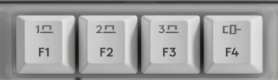
- Choose how you want to connect your keyboard to the second computer.
-
Via Bluetooth
Open the Bluetooth settings on your computer to complete the pairing. You may refer to Bluetooth - Pairing and Troubleshooting. -
Via Logi Bolt receiver
1. Plug the Logi Bolt receiver into the USB port of your computer. Open Logi Options+.
3. Click + ADD DEVICE and select Logi Bolt receiver.
4. Follow the on-screen instructions to pair.
-
Via Bluetooth
- You may also connect to your second computer via corded connectivity. You can trigger this automatically by plugging a cable to the Alto Keys and another side to your second computer.
- Once paired, a short press on the Easy-SwitchTM button will allow you to switch channels and F4 for the corded channel.
Tärkeä huomautus: Logitech ei enää tue tai ylläpidä laiteohjelmistopäivitystyökalua. Suosittelemme käyttämään Logi Options+-sovellusta tuetuilla Logitech-laitteilla . Saat meiltä apua siirtymävaiheessa.
Tärkeä huomautus: Logitech ei enää tue tai ylläpidä Logitech Preference Manageria. Suosittelemme käyttämään Logi Options+-sovellusta tuetuilla Logitech-laitteilla . Saat meiltä apua siirtymävaiheessa.
Tärkeä huomautus: Logitech ei enää tue tai ylläpidä Logitech Control Centeriä. Suosittelemme käyttämään Logi Options+-sovellusta tuetuilla Logitech-laitteilla . Saat meiltä apua siirtymävaiheessa.
Tärkeä huomautus: Logitech ei enää tue tai ylläpidä Logitechin yhteydenmuodostusohjelmaa. Suosittelemme käyttämään Logi Options+-sovellusta tuetuilla Logitech-laitteilla . Saat meiltä apua siirtymävaiheessa.
Tärkeä huomautus: Logitech ei enää tue tai ylläpidä Unifying-ohjelmistoa. Suosittelemme käyttämään Logi Options+-sovellusta tuetuilla Logitech-laitteilla . Saat meiltä apua siirtymävaiheessa.
Tärkeä huomautus: Logitech ei enää tue tai ylläpidä SetPoint-ohjelmistoa. Suosittelemme käyttämään Logi Options+-sovellusta tuetuilla Logitech-laitteilla . Saat meiltä apua siirtymävaiheessa.
Usein esitetyt kysymykset
Tälle osastolle ei ole saatavilla tuotteita
Tuotteelle ei ole latauksia
Versiolle ei ole latauksia.
Compatible Product
