If haptic feedback isn't working on your MX Master 4, check the following:
- Make sure you're using the latest version of Windows 11 that supports haptics (March 2026 release and later).
- Check that the latest firmware version of MX Master 4 is installed.
- If you're using a Logi Bolt receiver to connect your device, the receiver should also be on the latest firmware.
For more information on the MX Master 4 Firmware Update, please see:
- Background Device Firmware Update (DFU) - MX Master 4
- Troubleshoot the Background Device Firmware Update
If you're using a Logi Bolt receiver, use the following steps to update the Bolt firmware:
- Plug in your Logi Bolt receiver.
IMPORTANT: The receiver must remain connected throughout the process. Avoid interruptions. - Make sure your MX Master 4 is paired with the receiver.
- Open the Logi Options+ app and click Settings.
-
In the General Settings window, click CHECK FOR UPDATE.
You’ll be notified if an update is available.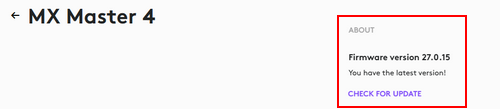
- Follow the on-screen prompts to apply the updates.
Fontos figyelmeztetés: A Logitech már nem támogatja a Firmware Update Tool alkalmazást, és frissítéseket sem ad ki hozzá. Erősen javasoljuk a Logi Options+ használatát atámogatott Logitech-eszközeihez Szívesen segítünk Önnek az átmenet során.
Fontos figyelmeztetés: A Logitech már nem támogatja a Preference Manager alkalmazást, és frissítéseket sem ad ki hozzá. Erősen javasoljuk a Logi Options+ használatát atámogatott Logitech-eszközeihez Szívesen segítünk Önnek az átmenet során.
Fontos figyelmeztetés: A Logitech már nem támogatja a Control Center alkalmazást, és frissítéseket sem ad ki hozzá. Erősen javasoljuk a Logi Options+ használatát atámogatott Logitech-eszközeihez Szívesen segítünk Önnek az átmenet során.
Fontos figyelmeztetés: A Logitech már nem támogatja a Connection Utility alkalmazást, és frissítéseket sem ad ki hozzá. Erősen javasoljuk a Logi Options+ használatát atámogatott Logitech-eszközeihez Szívesen segítünk Önnek az átmenet során.
Fontos figyelmeztetés: A Logitech már nem támogatja a Unifying szoftvert, és frissítéseket sem ad ki hozzá. Erősen javasoljuk a Logi Options+ használatát atámogatott Logitech-eszközeihez Szívesen segítünk Önnek az átmenet során.
Fontos figyelmeztetés: A Logitech már nem támogatja és nem tartja karban a SetPoint szoftvert. Erősen javasoljuk a Logi Options+ használatát atámogatott Logitech-eszközeihez Szívesen segítünk Önnek az átmenet során.
Gyakori kérdések
Ehhez a szakaszhoz nincsenek elérhető termékek
Nincs letöltés ehhez a termékhez
Ehhez a verzióhoz nincsenek letöltések.
Compatible Product
