To pair your device to a second computer:
- Press and hold the Easy-SwitchTM button (F1-F3) that you will use for the second computer via wireless connectivity for three seconds. This will put your keyboard in pairing mode and the LED light will start blinking fast.
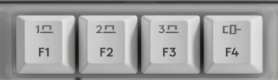
- Choose how you want to connect your keyboard to the second computer.
-
Via Bluetooth
Open the Bluetooth settings on your computer to complete the pairing. You may refer to Bluetooth - Pairing and Troubleshooting. -
Via Logi Bolt receiver
1. Plug the Logi Bolt receiver into the USB port of your computer. Open Logi Options+.
3. Click + ADD DEVICE and select Logi Bolt receiver.
4. Follow the on-screen instructions to pair.
-
Via Bluetooth
- You may also connect to your second computer via corded connectivity. You can trigger this automatically by plugging a cable to the Alto Keys and another side to your second computer.
- Once paired, a short press on the Easy-SwitchTM button will allow you to switch channels and F4 for the corded channel.
Fontos figyelmeztetés: A Logitech már nem támogatja a Firmware Update Tool alkalmazást, és frissítéseket sem ad ki hozzá. Erősen javasoljuk a Logi Options+ használatát atámogatott Logitech-eszközeihez Szívesen segítünk Önnek az átmenet során.
Fontos figyelmeztetés: A Logitech már nem támogatja a Preference Manager alkalmazást, és frissítéseket sem ad ki hozzá. Erősen javasoljuk a Logi Options+ használatát atámogatott Logitech-eszközeihez Szívesen segítünk Önnek az átmenet során.
Fontos figyelmeztetés: A Logitech már nem támogatja a Control Center alkalmazást, és frissítéseket sem ad ki hozzá. Erősen javasoljuk a Logi Options+ használatát atámogatott Logitech-eszközeihez Szívesen segítünk Önnek az átmenet során.
Fontos figyelmeztetés: A Logitech már nem támogatja a Connection Utility alkalmazást, és frissítéseket sem ad ki hozzá. Erősen javasoljuk a Logi Options+ használatát atámogatott Logitech-eszközeihez Szívesen segítünk Önnek az átmenet során.
Fontos figyelmeztetés: A Logitech már nem támogatja a Unifying szoftvert, és frissítéseket sem ad ki hozzá. Erősen javasoljuk a Logi Options+ használatát atámogatott Logitech-eszközeihez Szívesen segítünk Önnek az átmenet során.
Fontos figyelmeztetés: A Logitech már nem támogatja és nem tartja karban a SetPoint szoftvert. Erősen javasoljuk a Logi Options+ használatát atámogatott Logitech-eszközeihez Szívesen segítünk Önnek az átmenet során.
Gyakori kérdések
Ehhez a szakaszhoz nincsenek elérhető termékek
Nincs letöltés ehhez a termékhez
Ehhez a verzióhoz nincsenek letöltések.
Compatible Product
