If haptic feedback isn't working on your MX Master 4, check the following:
- Make sure you're using the latest version of Windows 11 that supports haptics (March 2026 release and later).
- Check that the latest firmware version of MX Master 4 is installed.
- If you're using a Logi Bolt receiver to connect your device, the receiver should also be on the latest firmware.
For more information on the MX Master 4 Firmware Update, please see:
- Background Device Firmware Update (DFU) - MX Master 4
- Troubleshoot the Background Device Firmware Update
If you're using a Logi Bolt receiver, use the following steps to update the Bolt firmware:
- Plug in your Logi Bolt receiver.
IMPORTANT: The receiver must remain connected throughout the process. Avoid interruptions. - Make sure your MX Master 4 is paired with the receiver.
- Open the Logi Options+ app and click Settings.
-
In the General Settings window, click CHECK FOR UPDATE.
You’ll be notified if an update is available.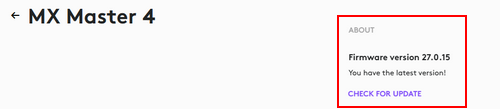
- Follow the on-screen prompts to apply the updates.
Nota importante: lo strumento di aggiornamento del firmware non è più supportato o gestito da Logitech. Si consiglia vivamente di utilizzare Logi Options+ per i dispositivi Logitech supportati. Siamo qui per assisterti durante questa transizione.
Nota importante: Logitech Preference Manager non è più supportato o gestito da Logitech. Si consiglia vivamente di utilizzare Logi Options+ per i dispositivi Logitech supportati. Siamo qui per assisterti durante questa transizione.
Nota importante: Logitech Control Center non è più supportato o gestito da Logitech. Si consiglia vivamente di utilizzare Logi Options+ per i dispositivi Logitech supportati. Siamo qui per assisterti durante questa transizione.
Nota importante: l'utilità di connessione Logitech non è più supportata o gestita da Logitech. Si consiglia vivamente di utilizzare Logi Options+ per i dispositivi Logitech supportati. Siamo qui per assisterti durante questa transizione.
Nota importante: il software Unifying non è più supportato o gestito da Logitech. Si consiglia vivamente di utilizzare Logi Options+ per i dispositivi Logitech supportati. Siamo qui per assisterti durante questa transizione.
Nota importante: Il software SetPoint non è più supportato o gestito da Logitech. Si consiglia vivamente di utilizzare Logi Options+ per i dispositivi Logitech supportati. Siamo qui per assisterti durante questa transizione.
Domande frequenti
Non ci sono prodotti disponibili per questa sezione
Non ci sono download per questo prodotto
Non sono disponibili download per questa versione.
Compatible Product
