Yes, your Tarah Pro earbuds will turn off automatically when they are connected to your Bluetooth® audio device and have been in an idle state for 15 minutes (i.e.not playing music or in a phone call).
Your Tarah Pro will also turn off, after 15 minutes, if not connected to your Bluetooth audio device.
When the earbuds are snapped together they disconnect from your audio device and re-connect when you pull the earbuds apart. If the earbuds are left snapped together for 15 minutes or more, the earbuds will power off.
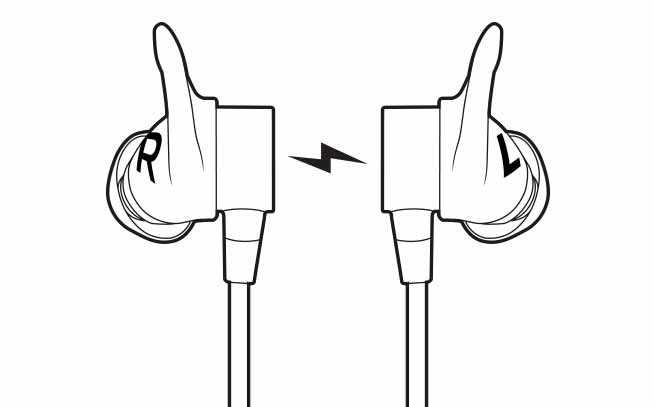
This feature helps conserve the earbuds battery when you are not actively using your earbuds.
To re-connect your earbuds after they have turned off:
- Make sure Bluetooth on your audio device is on.
- Press and hold the middle button on the inline remote until you hear an ascending “Power on” tone and the LED turns solid white.
- Once your Tarah Pro earbuds have connected to your audio device you will hear the “Connected” voice prompt.
重要なお知らせ:ファームウェア更新ツールのロジクールによるサポートと保守は終了しました。Logi Options+をサポート対象のロジクールデバイスにご利用いただくことを強くお勧めします。この移行についてご質問等ございましたら、ロジクールまでお問い合わせください。
重要なお知らせ:ロジクール環境設定マネージャのロジクールによるサポートと保守は終了しました。Logi Options+をサポート対象のロジクールデバイスにご利用いただくことを強くお勧めします。この移行についてご質問等ございましたら、ロジクールまでお問い合わせください。
重要なお知らせ:ロジクール Control Center のロジクールによるサポートと保守は終了しました。Logi Options+をサポート対象のロジクールデバイスにご利用いただくことを強くお勧めします。この移行についてご質問等ございましたら、ロジクールまでお問い合わせください。
重要なお知らせ:ロジクール接続ユーティリティのロジクールによるサポートと保守は終了しました。Logi Options+をサポート対象のロジクールデバイスにご利用いただくことを強くお勧めします。この移行についてご質問等ございましたら、ロジクールまでお問い合わせください。
重要なお知らせ:Unifying ソフトウェアのロジクールによるサポートと保守は終了しました。Logi Options+をサポート対象のロジクールデバイスにご利用いただくことを強くお勧めします。この移行についてご質問等ございましたら、ロジクールまでお問い合わせください。
重要なお知らせ:SetPoint ソフトウェアのロジクールによるサポートと保守は終了しました。Logi Options+をサポート対象のロジクールデバイスにご利用いただくことを強くお勧めします。この移行についてご質問等ございましたら、ロジクールまでお問い合わせください。
よくある質問
このセクションでは利用可能な製品がありません
この製品用のダウンロードはありません
このバージョンのダウンロードはありません。
Compatible Product
