If you installed one of the beta versions of MIXLINE and then upgrade to the public 1.0 release of MIXLINE, you might encounter an issue where MIXLINE is unexpectedly uninstalled after you reboot your computer. A hotfix is coming to address the issue for the future.
Until then, if you’re experiencing this issue there are some manual steps that you can take to resolve it:
- Download the 1.0 installer. The file should be MIXLINE-1.0.59.3453.msi.
- Double-click on MIXLINE-1.0.59.3453.msi.
- You'll see a dialog prompting you to locate the MSI installation package. It should reference 1.0.59.3453 under a MIXLINE\updates directory.
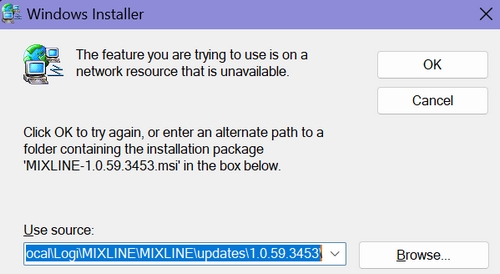
- Browse and pick the MSI file that you just double-clicked, which should be MIXLINE-1.0.59.3453.msi.
You'll see a Modify/Repair/Remove dialog box.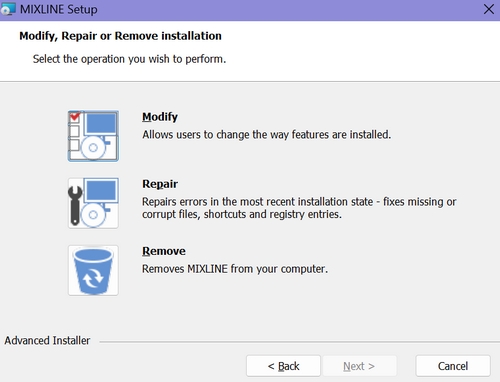
- Choose the Remove option. It will make some progress, and then you'll see an error letting you know that there's a problem with the installer.
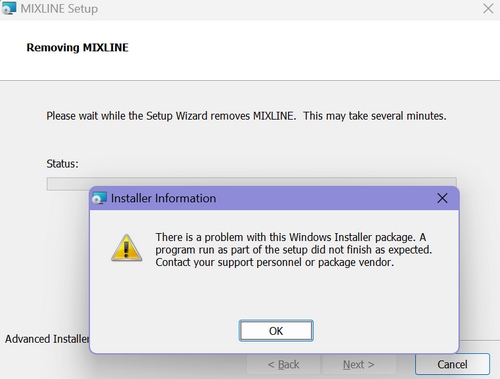
- Click OK.
- Double-click the MSI file again. This time it should install correctly.
重要なお知らせ:ファームウェア更新ツールのロジクールによるサポートと保守は終了しました。Logi Options+をサポート対象のロジクールデバイスにご利用いただくことを強くお勧めします。この移行についてご質問等ございましたら、ロジクールまでお問い合わせください。
重要なお知らせ:ロジクール環境設定マネージャのロジクールによるサポートと保守は終了しました。Logi Options+をサポート対象のロジクールデバイスにご利用いただくことを強くお勧めします。この移行についてご質問等ございましたら、ロジクールまでお問い合わせください。
重要なお知らせ:ロジクール Control Center のロジクールによるサポートと保守は終了しました。Logi Options+をサポート対象のロジクールデバイスにご利用いただくことを強くお勧めします。この移行についてご質問等ございましたら、ロジクールまでお問い合わせください。
重要なお知らせ:ロジクール接続ユーティリティのロジクールによるサポートと保守は終了しました。Logi Options+をサポート対象のロジクールデバイスにご利用いただくことを強くお勧めします。この移行についてご質問等ございましたら、ロジクールまでお問い合わせください。
重要なお知らせ:Unifying ソフトウェアのロジクールによるサポートと保守は終了しました。Logi Options+をサポート対象のロジクールデバイスにご利用いただくことを強くお勧めします。この移行についてご質問等ございましたら、ロジクールまでお問い合わせください。
重要なお知らせ:SetPoint ソフトウェアのロジクールによるサポートと保守は終了しました。Logi Options+をサポート対象のロジクールデバイスにご利用いただくことを強くお勧めします。この移行についてご質問等ございましたら、ロジクールまでお問い合わせください。
よくある質問
このセクションでは利用可能な製品がありません
この製品用のダウンロードはありません
このバージョンのダウンロードはありません。
Compatible Product
