
- What is KEYCONTROL?
- Which Logitech G Keyboards support KEYCONTROL?
- How to enable KEYCONTROL out of the box?
- Can I change the default KEYCONTROL toggle shortcut to another key on my gaming keyboard?
What is KEYCONTROL?
KEYCONTROL Technology refers to the ability to customize all aspects of a Logitech G Keyboard, including the layout, key mapping, and lighting.
Which Logitech G Keyboards support KEYCONTROL?
- PRO X 60
- G316 X
- G316
- G515 TKL
- G515 LIGHTSPEED TKL
- G515 LIGHTSPEED TKL Kamisato Ayaka special edition
- G515 RAPID TKL
- G517 LIGHTSPEED TKL
- G517 LIGHTSPEED TKL Kamisato Ayaka limited edition
- G915 X
- G915 X LIGHTSPEED
- G915 X LIGHTSPEED TKL
- PRO X TKL RAPID
- G915 X 75
- G915 X 98
- G512 X 75
- G512 X 98
- G316 X 98
- G316 X 75
- G316 X RAPID ARENA Edition
- PRO X2 RAPID
How to enable KEYCONTROL out of the box?
When your gaming keyboard is just out of the box and you have connected it with G HUB, you need to first assign a customization to any of the keys.
This activates KEYCONTROL mode which you can then enable and disable using the below shown shortcut according to your Logitech G Keyboard.
Keyboard(s) with FN+A shortcut:
PRO X 60
Keyboard(s) with FN+1 shortcut:
- G316 X
- G316
- G515 TKL
- G515 LIGHTSPEED TKL
- G515 LIGHTSPEED TKL Kamisato Ayaka special edition
- G515 RAPID TKL
- G517 LIGHTSPEED TKL
- G517 LIGHTSPEED TKL Kamisato Ayaka limited edition
- G915 X
- G915 X LIGHTSPEED
- G915 X LIGHTSPEED TKL
- PRO X TKL RAPID
- G915 X 75
- G915 X 98
- G512 X 75
- G512 X 98
- G316 X 98
- G316 X 75
- G316 X RAPID ARENA Edition
- PRO X2 RAPID
Can I change the default KEYCONTROL toggle shortcut to another key on my gaming keyboard?
Using G HUB, you can change the defaults to any other key.
To assign a different shortcut to enable/disable KEYCONTROL:
-
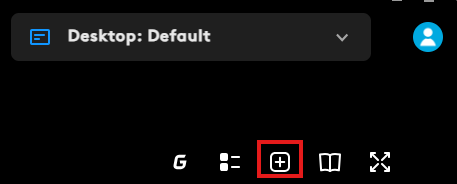
On the Assignments tab in G HUB, click the + icon at the top right corner.
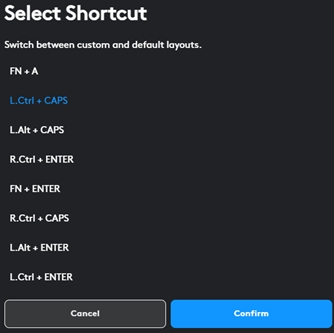
A pop-up menu appears where you can select the combination of your choice. Click Confirm when you're done.
Although your change is controlled by software, the KEYCONTROL LED on the keyboard will still light up the default key for three seconds when it is toggled.
重要なお知らせ:ファームウェア更新ツールのロジクールによるサポートと保守は終了しました。Logi Options+をサポート対象のロジクールデバイスにご利用いただくことを強くお勧めします。この移行についてご質問等ございましたら、ロジクールまでお問い合わせください。
重要なお知らせ:ロジクール環境設定マネージャのロジクールによるサポートと保守は終了しました。Logi Options+をサポート対象のロジクールデバイスにご利用いただくことを強くお勧めします。この移行についてご質問等ございましたら、ロジクールまでお問い合わせください。
重要なお知らせ:ロジクール Control Center のロジクールによるサポートと保守は終了しました。Logi Options+をサポート対象のロジクールデバイスにご利用いただくことを強くお勧めします。この移行についてご質問等ございましたら、ロジクールまでお問い合わせください。
重要なお知らせ:ロジクール接続ユーティリティのロジクールによるサポートと保守は終了しました。Logi Options+をサポート対象のロジクールデバイスにご利用いただくことを強くお勧めします。この移行についてご質問等ございましたら、ロジクールまでお問い合わせください。
重要なお知らせ:Unifying ソフトウェアのロジクールによるサポートと保守は終了しました。Logi Options+をサポート対象のロジクールデバイスにご利用いただくことを強くお勧めします。この移行についてご質問等ございましたら、ロジクールまでお問い合わせください。
重要なお知らせ:SetPoint ソフトウェアのロジクールによるサポートと保守は終了しました。Logi Options+をサポート対象のロジクールデバイスにご利用いただくことを強くお勧めします。この移行についてご質問等ございましたら、ロジクールまでお問い合わせください。
よくある質問
このセクションでは利用可能な製品がありません
この製品用のダウンロードはありません
このバージョンのダウンロードはありません。
Compatible Product
