Gestures
Gesture controls let the touchpad turn specific hand movements into interactions with your computer. From clicking or scrolling up and down, to swiping between windows or apps.
If you’re a Mac user, you’ll need to download the Logi Options+ app to unlock some gestures that will feel familiar to what you’re used to.
Click on the link for your operating system to find the complete gesture suite:
Cursor Speed
You can change the speed and accuracy of your cursor for optimal control on Logi Options+ or on the native settings of your laptop.
To use Logi Options+
- Select Casa Touch on Logi Options+.
- Go to tthe Point and Click section.
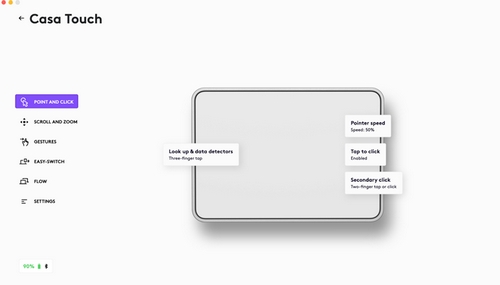
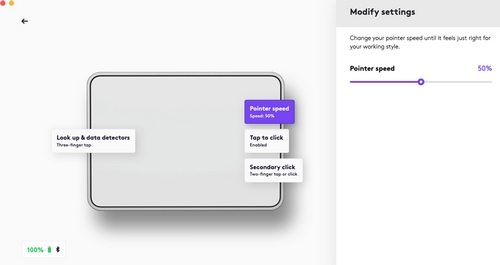
- Adjust the Pointer speed slider to the speed you want. Left is slower and right is faster.
To use Native settings
-
Windows:
Open Settings > click Bluetooth & Devices. On the right, click on Touchpad. Adjust the Cursor Speed to the speed you want. - macOS: Open Settings > click on Mouse. Adjust the Tracking Speed to the speed you want. NOTE: Setting the tracking speed using Trackpad native settings won't adjust the speed of Casa Touch. Be sure to use Mouse when setting the tracking speed for your Casa Touch.
- ChromeOS: Open Settings > Click on Device. Select Mouse and touchpad or Touchpad. Adjust the Touchpad Speed to the speed you want.
- iPadOS: Open Settings > click on General. Select Trackpad & Mouse and adjust the Tracking Speed to the speed you want.
중요 고지: Logitech은 펌웨어 업데이트 도구를 더 이상 지원하거나 유지보수하지 않습니다. 지원되는 Logitech 장치 에는 Logi Options+ 사용을 적극 권장합니다. 전환 과정에서 도움이 필요하시면 언제든지 도와드리겠습니다.
중요 고지: Logitech은 Logitech Preference Manager를 더 이상 지원하거나 유지보수하지 않습니다. 지원되는 Logitech 장치에는 Logi Options+ 사용을 적극 권장합니다. 전환 과정에서 도움이 필요하시면 언제든지 도와드리겠습니다.
중요 고지: Logitech은 Logitech Control Center를 더이상 지원하거나 유지보수하지 않습니다. 지원되는 Logitech 장치에는 Logi Options+ 사용을 적극 권장합니다. 전환 과정에서 도움이 필요하시면 언제든지 도와드리겠습니다.
중요 고지: Logitech은 Logitech Connection Utility를 더이상 지원하거나 유지보수하지 않습니다. 지원되는 Logitech 장치에는 Logi Options+ 사용을 적극 권장합니다. 전환 과정에서 도움이 필요하시면 언제든지 도와드리겠습니다.
중요 고지: Unifying 소프트웨어는 더 이상 Logitech에서 지원하거나 유지보수하지 않습니다. 지원되는 Logitech 장치에는 Logi Options+를 사용하는 것을 적극 권장합니다. 전환 과정에서 도움이 필요하시면 언제든지 도와드리겠습니다.
중요 고지: Logitech은 SetPoint 소프트웨어를 더 이상 지원하지 않습니다. 지원되는 Logitech 장치에는 Logi Options+ 사용을 적극 권장합니다. 전환 과정에서 도움이 필요하시면 언제든지 도와드리겠습니다.
FAQ(자주 묻는 질문)
이 섹션에 사용할 수있는 제품이 없습니다
이 제품에 대한 다운로드가 없습니다.
이 버전에 대한 다운로드가 없습니다.
Compatible Product
