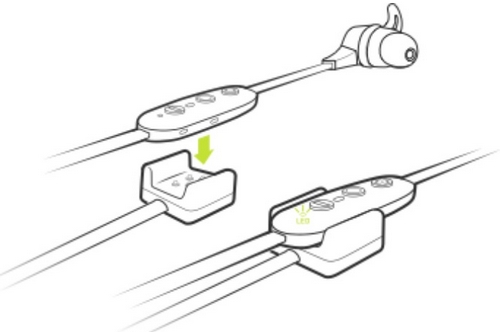
Your Jaybird X4 buds come with a directional charging clip. To charge, follow the steps below.
- Connect the charging clip to the inline remote on your X4 buds with the Micro USB connector facing away from the earpiece. You’ll notice the charging clip is tapered just like the inline remote. The wider section of the charging clip aligns with the wider section of the remote.
- Connect the other end of the USB charging cable to a USB power source.
- Limit the charge time to 2.5 hours. To get the most out of your battery it is recommended to charge the buds when you hear the ‘Charge Me’ voice prompt (about 10% battery remaining). If you’re pressed for time and only have time to partially charge your buds, you’ll get around an hour of playtime for every 10 minutes of charge. When turned on and not playing music, pressing Volume + or Volume – will announce the battery level. If you download and connect to the Jaybird app you will be able to see your battery level to within 1%.
NOTE: Make sure to check the charging source before you begin charging. We recommend using a computer as it’s the best and safest method. Anything 1 amp or less is safe. Some chargers can produce a lot more power than is needed to charge your buds, so try and avoid them.
중요 고지: Logitech은 펌웨어 업데이트 도구를 더 이상 지원하거나 유지보수하지 않습니다. 지원되는 Logitech 장치 에는 Logi Options+ 사용을 적극 권장합니다. 전환 과정에서 도움이 필요하시면 언제든지 도와드리겠습니다.
중요 고지: Logitech은 Logitech Preference Manager를 더 이상 지원하거나 유지보수하지 않습니다. 지원되는 Logitech 장치에는 Logi Options+ 사용을 적극 권장합니다. 전환 과정에서 도움이 필요하시면 언제든지 도와드리겠습니다.
중요 고지: Logitech은 Logitech Control Center를 더이상 지원하거나 유지보수하지 않습니다. 지원되는 Logitech 장치에는 Logi Options+ 사용을 적극 권장합니다. 전환 과정에서 도움이 필요하시면 언제든지 도와드리겠습니다.
중요 고지: Logitech은 Logitech Connection Utility를 더이상 지원하거나 유지보수하지 않습니다. 지원되는 Logitech 장치에는 Logi Options+ 사용을 적극 권장합니다. 전환 과정에서 도움이 필요하시면 언제든지 도와드리겠습니다.
중요 고지: Unifying 소프트웨어는 더 이상 Logitech에서 지원하거나 유지보수하지 않습니다. 지원되는 Logitech 장치에는 Logi Options+를 사용하는 것을 적극 권장합니다. 전환 과정에서 도움이 필요하시면 언제든지 도와드리겠습니다.
중요 고지: Logitech은 SetPoint 소프트웨어를 더 이상 지원하지 않습니다. 지원되는 Logitech 장치에는 Logi Options+ 사용을 적극 권장합니다. 전환 과정에서 도움이 필요하시면 언제든지 도와드리겠습니다.
FAQ(자주 묻는 질문)
이 섹션에 사용할 수있는 제품이 없습니다
이 제품에 대한 다운로드가 없습니다.
이 버전에 대한 다운로드가 없습니다.
Compatible Product
