Smart Actions templates can be found on the Template tab. The templates were created by Logitech to give you some ideas and to help get you started. Every template represents a Smart Action. You can hover over the icons with your mouse to see the first actions of the Smart Actions.
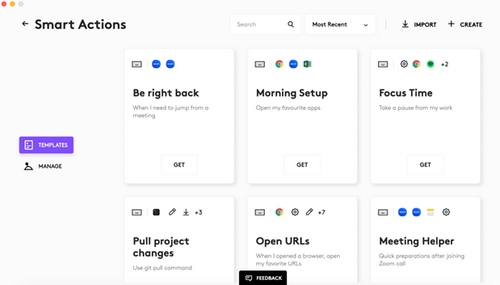
Click Add to enter edit mode for Smart Actions. You can use it as it is, just add a trigger. You can also edit it to match your needs. To add the Smart Action, press Save. It will be added to your collection on the Manage tab.
Viktig anmärkning: Uppdateringsverktyget för inbyggd programvara stöds eller underhålls inte längre av Logitech. Vi rekommenderar starkt att du använder Logi Options+ för dina Logitech-enheter som stöds. Vi finns här om du behöver hjälp under övergången.
Viktig anmärkning: Logitech Preference Manager stöds eller underhålls inte längre av Logitech. Vi rekommenderar starkt att du använder Logi Options+ för dina Logitech-enheter som stöds. Vi finns här om du behöver hjälp under övergången.
Viktig anmärkning: Logitech Control Center stöds eller underhålls inte längre av Logitech. Vi rekommenderar starkt att du använder Logi Options+ för dina Logitech-enheter som stöds. Vi finns här om du behöver hjälp under övergången.
Viktig anmärkning: Logitechs anslutningsverktyg stöds eller underhålls inte längre av Logitech. Vi rekommenderar starkt att du använder Logi Options+ för dina Logitech-enheter som stöds. Vi finns här om du behöver hjälp under övergången.
Viktig anmärkning: Unifying-programvaran stöds eller underhålls inte längre av Logitech. Vi rekommenderar starkt att du använder Logi Options+ för dina Logitech-enheter som stöds. Vi finns här om du behöver hjälp under övergången.
Viktig anmärkning: SetPoint-programvaran stöds eller underhålls inte längre av Logitech. Vi rekommenderar starkt att du använder Logi Options+ för dina Logitech-enheter som stöds. Vi finns här om du behöver hjälp under övergången.
Vanliga frågor
Det finns inga tillgängliga produkter för den här sektionen
Det finns inga nedladdningar för denna produkt
Det finns inga nedladdningar för den här versionen.
Compatible Product
