Yes, your Tarah Pro earbuds will turn off automatically when they are connected to your Bluetooth® audio device and have been in an idle state for 15 minutes (i.e.not playing music or in a phone call).
Your Tarah Pro will also turn off, after 15 minutes, if not connected to your Bluetooth audio device.
When the earbuds are snapped together they disconnect from your audio device and re-connect when you pull the earbuds apart. If the earbuds are left snapped together for 15 minutes or more, the earbuds will power off.
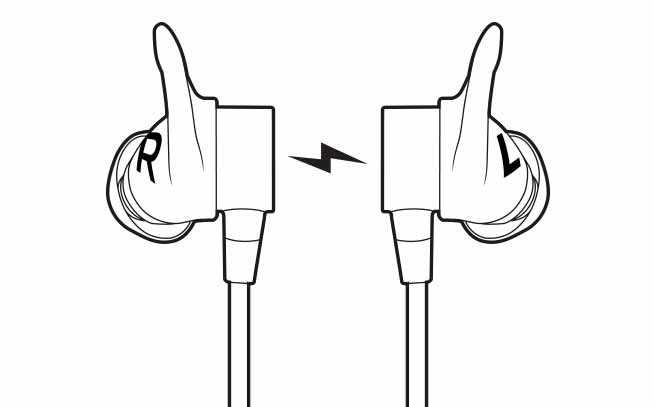
This feature helps conserve the earbuds battery when you are not actively using your earbuds.
To re-connect your earbuds after they have turned off:
- Make sure Bluetooth on your audio device is on.
- Press and hold the middle button on the inline remote until you hear an ascending “Power on” tone and the LED turns solid white.
- Once your Tarah Pro earbuds have connected to your audio device you will hear the “Connected” voice prompt.
Viktig anmärkning: Uppdateringsverktyget för inbyggd programvara stöds eller underhålls inte längre av Logitech. Vi rekommenderar starkt att du använder Logi Options+ för dina Logitech-enheter som stöds. Vi finns här om du behöver hjälp under övergången.
Viktig anmärkning: Logitech Preference Manager stöds eller underhålls inte längre av Logitech. Vi rekommenderar starkt att du använder Logi Options+ för dina Logitech-enheter som stöds. Vi finns här om du behöver hjälp under övergången.
Viktig anmärkning: Logitech Control Center stöds eller underhålls inte längre av Logitech. Vi rekommenderar starkt att du använder Logi Options+ för dina Logitech-enheter som stöds. Vi finns här om du behöver hjälp under övergången.
Viktig anmärkning: Logitechs anslutningsverktyg stöds eller underhålls inte längre av Logitech. Vi rekommenderar starkt att du använder Logi Options+ för dina Logitech-enheter som stöds. Vi finns här om du behöver hjälp under övergången.
Viktig anmärkning: Unifying-programvaran stöds eller underhålls inte längre av Logitech. Vi rekommenderar starkt att du använder Logi Options+ för dina Logitech-enheter som stöds. Vi finns här om du behöver hjälp under övergången.
Viktig anmärkning: SetPoint-programvaran stöds eller underhålls inte längre av Logitech. Vi rekommenderar starkt att du använder Logi Options+ för dina Logitech-enheter som stöds. Vi finns här om du behöver hjälp under övergången.
Vanliga frågor
Det finns inga tillgängliga produkter för den här sektionen
Det finns inga nedladdningar för denna produkt
Det finns inga nedladdningar för den här versionen.
Compatible Product
