If you installed one of the beta versions of MIXLINE and then upgrade to the public 1.0 release of MIXLINE, you might encounter an issue where MIXLINE is unexpectedly uninstalled after you reboot your computer. A hotfix is coming to address the issue for the future.
Until then, if you’re experiencing this issue there are some manual steps that you can take to resolve it:
- Download the 1.0 installer. The file should be MIXLINE-1.0.59.3453.msi.
- Double-click on MIXLINE-1.0.59.3453.msi.
- You'll see a dialog prompting you to locate the MSI installation package. It should reference 1.0.59.3453 under a MIXLINE\updates directory.
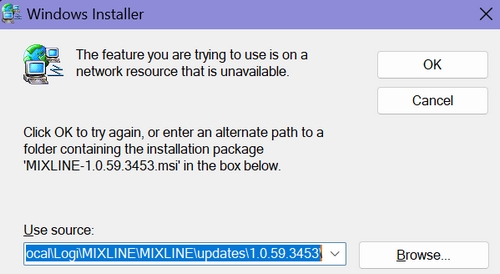
- Browse and pick the MSI file that you just double-clicked, which should be MIXLINE-1.0.59.3453.msi.
You'll see a Modify/Repair/Remove dialog box.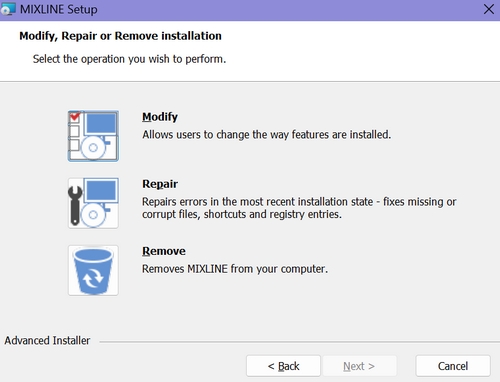
- Choose the Remove option. It will make some progress, and then you'll see an error letting you know that there's a problem with the installer.
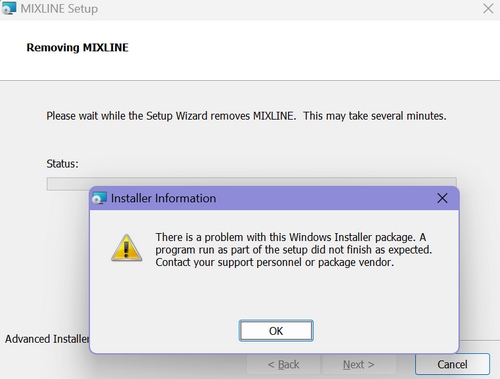
- Click OK.
- Double-click the MSI file again. This time it should install correctly.
Viktig anmärkning: Uppdateringsverktyget för inbyggd programvara stöds eller underhålls inte längre av Logitech. Vi rekommenderar starkt att du använder Logi Options+ för dina Logitech-enheter som stöds. Vi finns här om du behöver hjälp under övergången.
Viktig anmärkning: Logitech Preference Manager stöds eller underhålls inte längre av Logitech. Vi rekommenderar starkt att du använder Logi Options+ för dina Logitech-enheter som stöds. Vi finns här om du behöver hjälp under övergången.
Viktig anmärkning: Logitech Control Center stöds eller underhålls inte längre av Logitech. Vi rekommenderar starkt att du använder Logi Options+ för dina Logitech-enheter som stöds. Vi finns här om du behöver hjälp under övergången.
Viktig anmärkning: Logitechs anslutningsverktyg stöds eller underhålls inte längre av Logitech. Vi rekommenderar starkt att du använder Logi Options+ för dina Logitech-enheter som stöds. Vi finns här om du behöver hjälp under övergången.
Viktig anmärkning: Unifying-programvaran stöds eller underhålls inte längre av Logitech. Vi rekommenderar starkt att du använder Logi Options+ för dina Logitech-enheter som stöds. Vi finns här om du behöver hjälp under övergången.
Viktig anmärkning: SetPoint-programvaran stöds eller underhålls inte längre av Logitech. Vi rekommenderar starkt att du använder Logi Options+ för dina Logitech-enheter som stöds. Vi finns här om du behöver hjälp under övergången.
Vanliga frågor
Det finns inga tillgängliga produkter för den här sektionen
Det finns inga nedladdningar för denna produkt
Det finns inga nedladdningar för den här versionen.
Compatible Product
