The Next and Back buttons are designed for natural comfort and smooth, intuitive navigation. Their concave and convex surfaces make them easy to find by touch, so you can navigate slides without looking at the remote.
Next button
Click the Next button to move to the next slide. You can also swap the positions of the Next and Back buttons in Options+ if you prefer.
Back button
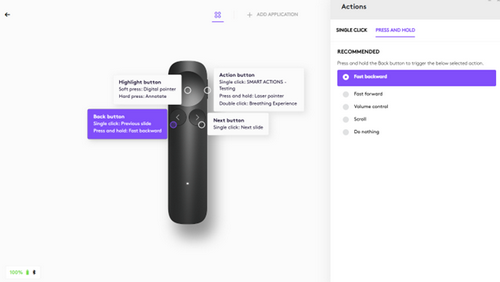
Click the Back button to move to the previous slide. You can also press and hold the button to trigger additional actions that you customize in Logi Options+, such as:
| Fast backward | Quickly move backward through slides |
| Fast forward | Quickly move forward through slides |
| Scroll* | Hold and move your hand up or down to scroll through web pages and documents. |
| Volume control* | Hold and move your hand up or down to adjust volume |
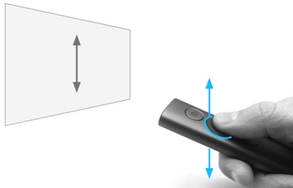
*The scroll and volume functions are gesture-based — hold the Back button and move your hand up or down to control them.
Viktig anmärkning: Uppdateringsverktyget för inbyggd programvara stöds eller underhålls inte längre av Logitech. Vi rekommenderar starkt att du använder Logi Options+ för dina Logitech-enheter som stöds. Vi finns här om du behöver hjälp under övergången.
Viktig anmärkning: Logitech Preference Manager stöds eller underhålls inte längre av Logitech. Vi rekommenderar starkt att du använder Logi Options+ för dina Logitech-enheter som stöds. Vi finns här om du behöver hjälp under övergången.
Viktig anmärkning: Logitech Control Center stöds eller underhålls inte längre av Logitech. Vi rekommenderar starkt att du använder Logi Options+ för dina Logitech-enheter som stöds. Vi finns här om du behöver hjälp under övergången.
Viktig anmärkning: Logitechs anslutningsverktyg stöds eller underhålls inte längre av Logitech. Vi rekommenderar starkt att du använder Logi Options+ för dina Logitech-enheter som stöds. Vi finns här om du behöver hjälp under övergången.
Viktig anmärkning: Unifying-programvaran stöds eller underhålls inte längre av Logitech. Vi rekommenderar starkt att du använder Logi Options+ för dina Logitech-enheter som stöds. Vi finns här om du behöver hjälp under övergången.
Viktig anmärkning: SetPoint-programvaran stöds eller underhålls inte längre av Logitech. Vi rekommenderar starkt att du använder Logi Options+ för dina Logitech-enheter som stöds. Vi finns här om du behöver hjälp under övergången.
Vanliga frågor
Det finns inga tillgängliga produkter för den här sektionen
Det finns inga nedladdningar för denna produkt
Det finns inga nedladdningar för den här versionen.
Compatible Product
