Overview
As part of our ongoing improvements to Options+, the AI Prompt Builder feature is no longer available as of May, 2026.
Why are we making this change?
We first launched the Logi AI Prompt Builder to help users create better prompts. Over the past two years, the AI landscape has evolved significantly, and user feedback indicates this feature is no longer helpful. So we’re removing the AI Prompt Builder to simplify Options+.
What is changing?
- AI Prompt Builder is no longer available as of May, 2026.
- For existing users, the AI Prompt Builder section will no longer be accessible in Logi Options+.
- Any custom assignments previously set up via the AI Prompt Builder, such as specific keys, buttons, or the "Open ChatGPT Overlay" action, will no longer function.
What is NOT changing?
- Other Options+ actions and features will continue to work as normal.
- Your existing settings outside of this AI Prompt Builder are unaffected.
What is replacing the Logi AI Prompt Builder?
Smart Actions are available in Options+. While they do not behave in the same way as AI Prompt Builder, they give you more flexibility and control over how your workflows are set up.
What are the existing templates of AI Smart Actions?
- Reply to message: Select the text you want to reply to and allow ChatGPT to generate a reply.
- Summarise text: Select the text and allow ChatGPT to summarise it
What should you do next?
To continue using similar workflows without interruption:
-
Review where you currently use AI Prompt Builder.
- Open Options+ and select any device that has an active shortcut for the AI Prompt Builder or the Open ChatGPT action.
-
Update your devices with new actions.
- Reassign these actions to other custom assignments available in Options+
- You may also go to the Smart Actions section and sort by “AI” to find alternatives to AI Prompt Builders recipes and copy/paste functionality. If you have not used Smart Actions before, learn how they work here.
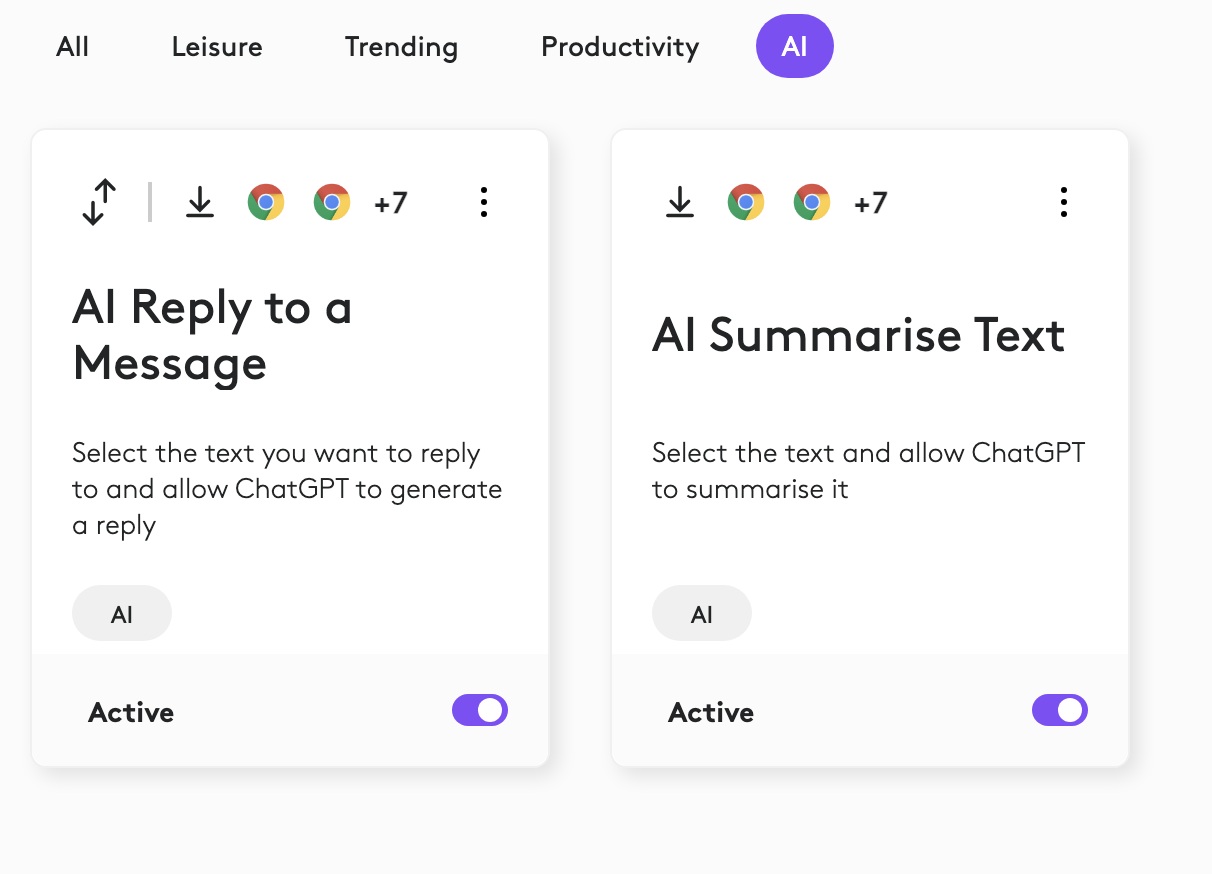
Below are some recommended options to help you replace or adapt your workflow:
| What you used before | What you can use now |
| Recipes: Reply to Message | Smart Actions: AI Reply to a Message |
| Recipes: Summarise | Smart Actions: AI Summarise Text |
Need help?
We understand that retiring a feature can be disruptive. Your feedback helps shape what we build next, so if AI Prompt Builder was critical to your workflow, we would like to hear from you. Visit https://support.logi.com/hc/en-us for feedback and support.
หมายเหตุสำคัญ: Logitech ไม่รองรับหรือบำรุงรักษาเครื่องมืออัปเดตเฟิร์มแวร์อีกต่อไปแล้ว เราขอแนะนำให้ใช้ Logi Options+ สำหรับอุปกรณ์ Logitech ที่รองรับ เราพร้อมให้ความช่วยเหลือคุณในระหว่างการเปลี่ยนแปลงนี้
หมายเหตุสำคัญ: Logitech ไม่รองรับหรือบำรุงรักษา Logitech Preference Manager อีกต่อไปแล้ว เราขอแนะนำให้ใช้ Logi Options+ สำหรับอุปกรณ์ Logitech ที่รองรับ เราพร้อมให้ความช่วยเหลือคุณในระหว่างการเปลี่ยนแปลงนี้
หมายเหตุสำคัญ: Logitech ไม่รองรับหรือบำรุงรักษา Logitech Control Center อีกต่อไปแล้ว เราขอแนะนำให้ใช้ Logi Options+ สำหรับอุปกรณ์ Logitech ที่รองรับ เราพร้อมให้ความช่วยเหลือคุณในระหว่างการเปลี่ยนแปลงนี้
หมายเหตุสำคัญ: Logitech ไม่รองรับหรือบำรุงรักษา Logitech Connection Utility อีกต่อไปแล้ว เราขอแนะนำให้ใช้ Logi Options+ สำหรับอุปกรณ์ Logitech ที่รองรับ เราพร้อมให้ความช่วยเหลือคุณในระหว่างการเปลี่ยนแปลงนี้
หมายเหตุสำคัญ: Logitech ไม่รองรับหรือบำรุงรักษา Unifying Software อีกต่อไปแล้ว เราขอแนะนำให้ใช้ Logi Options+ สำหรับอุปกรณ์ Logitech ที่รองรับ เราพร้อมให้ความช่วยเหลือคุณในระหว่างการเปลี่ยนแปลงนี้
หมายเหตุสำคัญ: ซอฟต์แวร์ SetPoint ไม่รองรับหรือดูแลรักษาโดย Logitech อีกต่อไป เราขอแนะนำให้ใช้ Logi Options+ สำหรับอุปกรณ์ Logitech ที่รองรับ เราพร้อมให้ความช่วยเหลือคุณในระหว่างการเปลี่ยนแปลงนี้
คำถามที่พบบ่อย
ไม่มีสินค้าสำหรับส่วนนี้
ไม่มีรายการดาวน์โหลดสำหรับผลิตภัณฑ์นี้
ไม่มีการดาวน์โหลดสำหรับเวอร์ชันนี้
Compatible Product
