What’s new in Options+ v2.2
Released in April 2026 (See Options+ Release Notes)
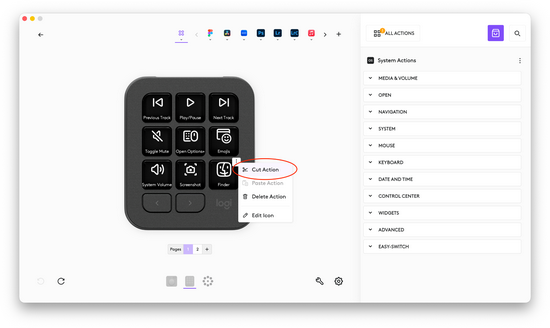
FIXED the CUT & PASTE BUG
WHAT: Now if you cut an element from one page and paste it on another page, it will not inadvertently also cut the element in the similar position in the receiving page.
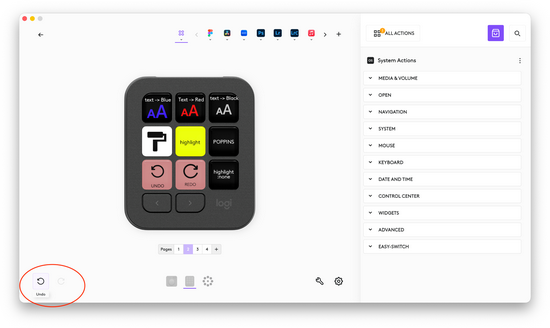
FIXED the UNDO & REDO page
WHAT: Fixed the undo & redo on the configuration page that was not always working and did not correctly mirror the actual physical device.
BUG FIXES
We have fixed these bugs:
| Plugin "Installing" appears in Marketplace after plugin installation was cancelled |
| [Console UI] "Windows Settings Application" action is not added to Didot folder when clicking the "Add an action" or drag and drop it |
| [Console UI] The profile selector is difficult to select whenever there is a pop-up showing up in the UI |
| [Consoles UI] Error state is not displayed for assigned action belonging to removed plugin until Console UI is reloaded |
| [Consoles UI] Plugin actions are not loaded if user switches devices fast |
| [Console UI] It is possible to open pasted action as if it was Didot Folder if pasting it instead of the latter one |
What’s new in Options+ v2.1
Released in March 2026 (See Options+ Release Notes)
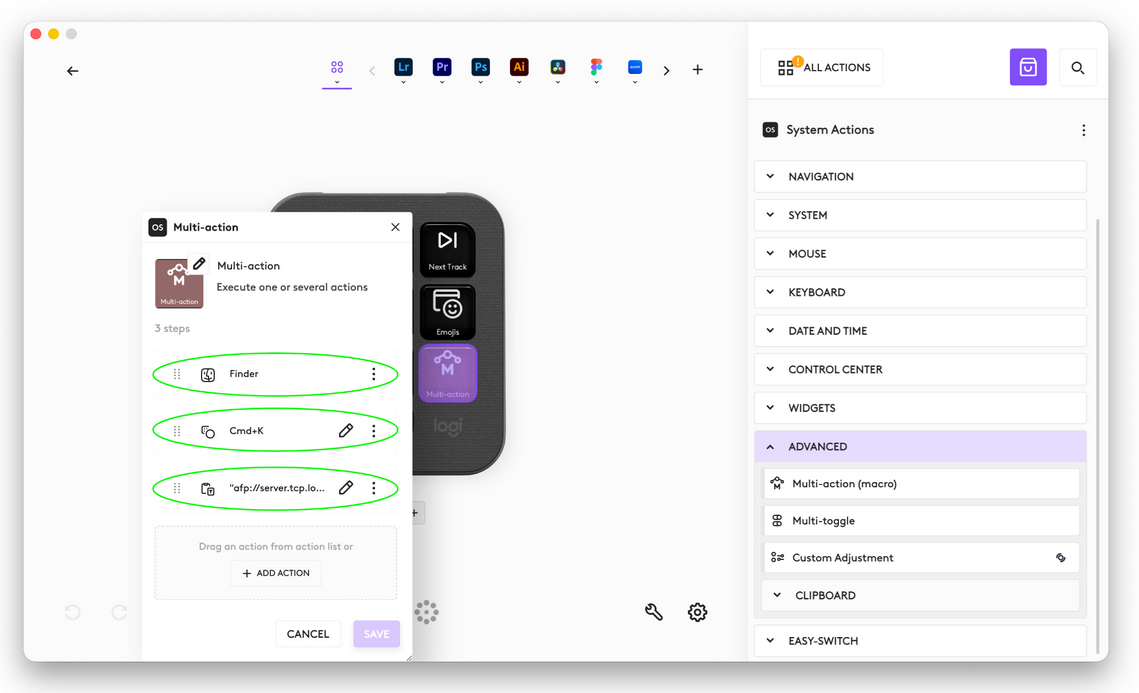
UPDATED MULTI-ACTION CONFIG UI
WHAT: You can now quickly visualize all content and action details in a multi-action when you open the action configuration popup.
WHY: Previously, you had to click and open individual actions contained in the multi-action in order to see the action details (ex. the keyboard shortcut, the paste text, or the app to open).
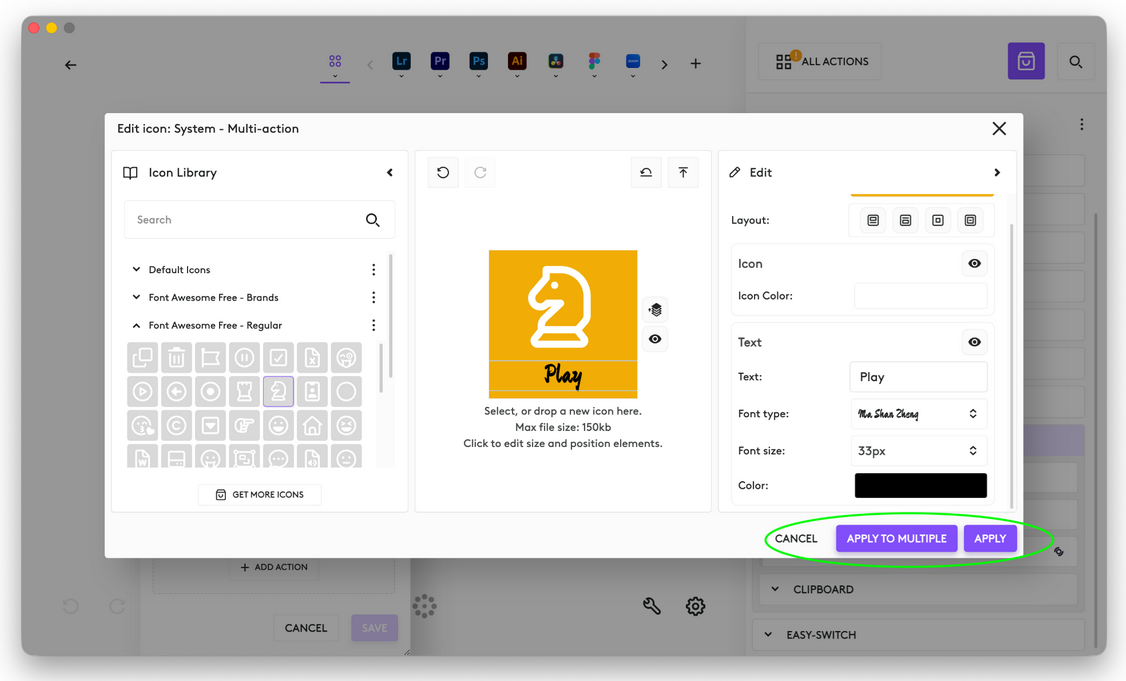
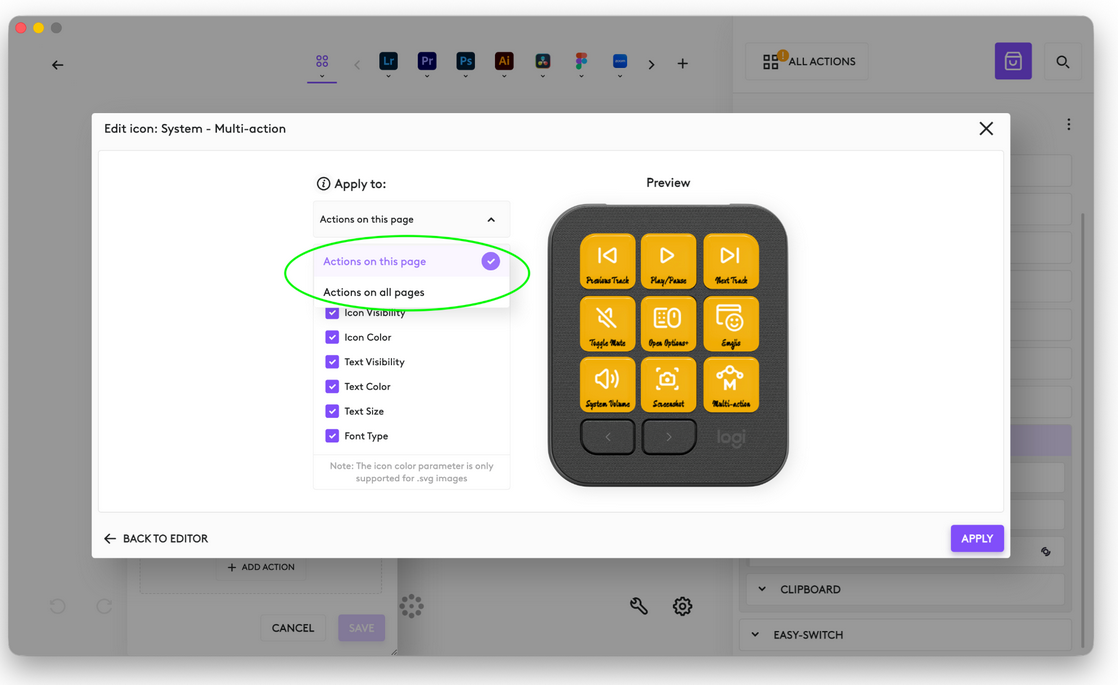
UPDATED ICON EDITOR
WHAT: We have reworded the buttons for APPLY TO MULTIPLE to clarify what happens when you access the batch editing icon function. We also have removed unnecessary options that were confusing (ex. pages in Actions Ring).
WHY: Some functionality was hidden or mislabeled — we simplified the UI and renamed the relevant buttons to make it clearer.
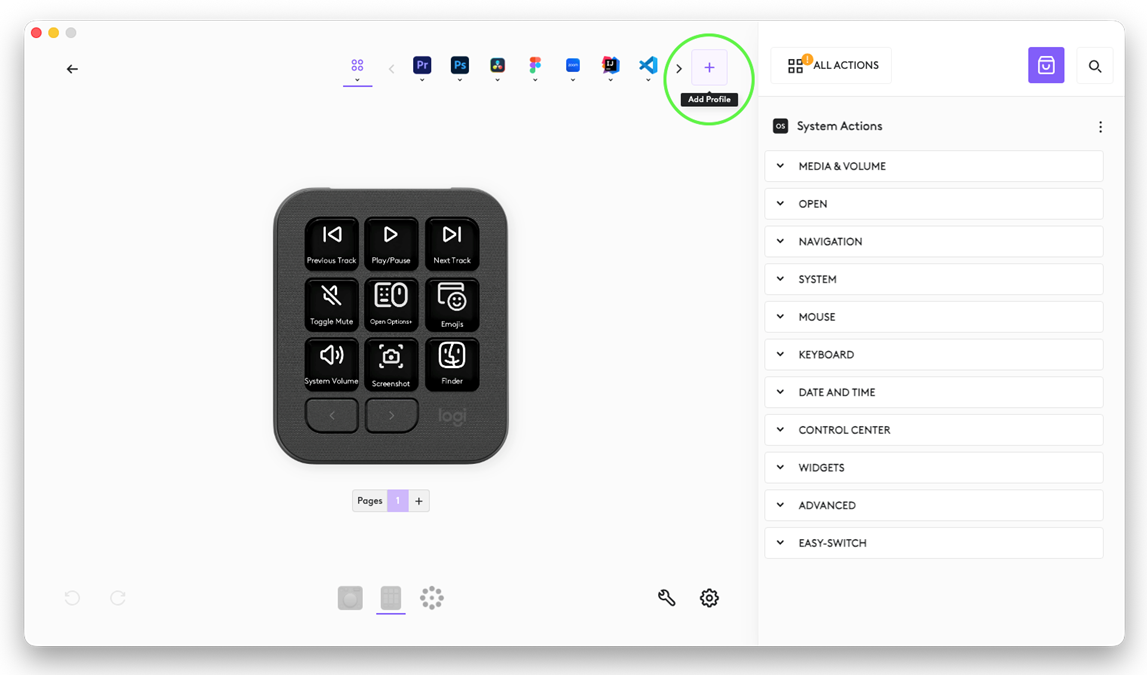
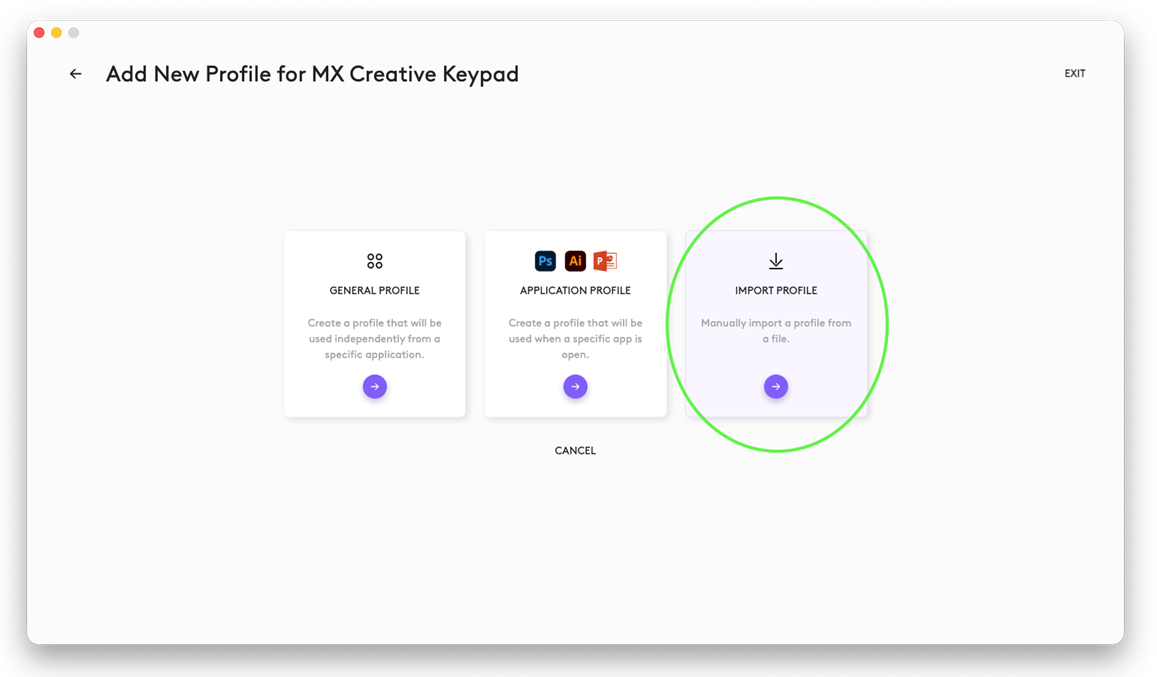
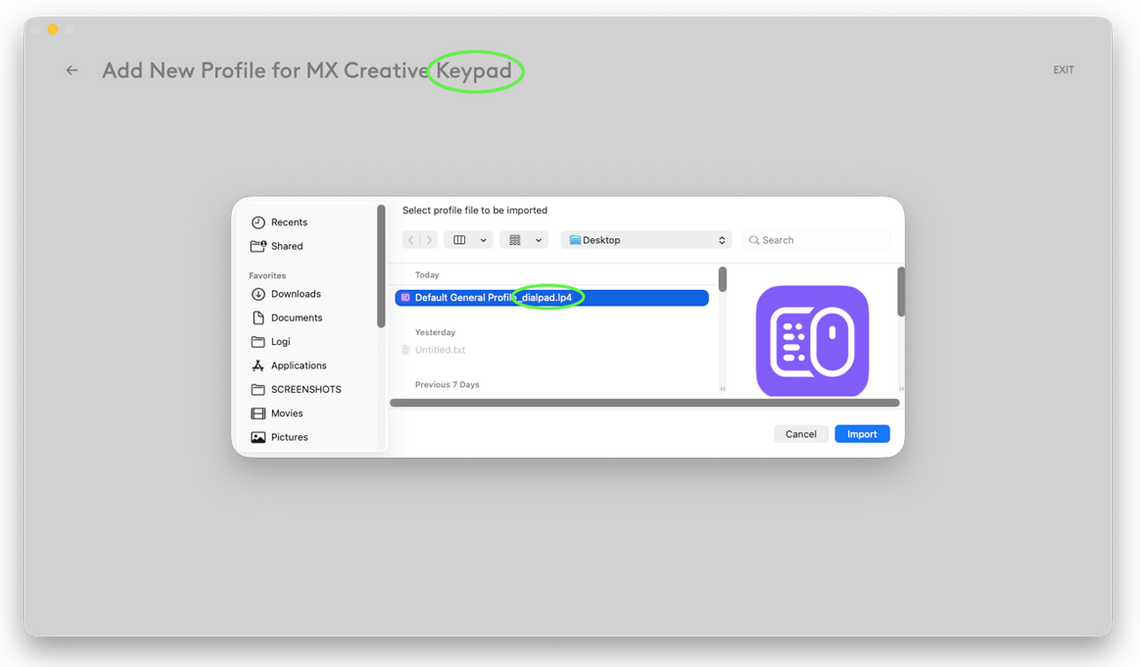
IMPORT PROFILE FROM ANY DEVICE
WHAT: You can now import a profile for any device, regardless if you clicked on the “+” (add) button from a different device.
WHY: Previously, you had to select the profile file for the same device you had selected when clicking the Add profile button.
BUG FIXES
We have fixed these bugs:
| [Console UI] The profile selector is difficult to select whenever there's a UI notification |
| [Profile][Mac] Fixed Import profile has two extensions .lp4.lp5 |
| [Console UI] Write renderer logs to enhance UI debugging |
| [Consoles UI] Open Application icon text does not update when its action name is changed |
| [Win][Console UI] [Random] Error "Application has just restarted" appears |
| [Consoles UI] Batch editing does not work if there are no changes in Icon Editor |
| [Consoles UI] Second layer of device Support menu (How to) is misaligned |
| [Consoles UI] 'Click to open' tooltip does not disappear if the Actions Ring folder is deleted |
| [CX][Multi-action] Modifications made to some "Duplicated" actions will affect original |
| [Actions Ring] Analog element is displayed as a discrete one on Actions Ring overlay |
What’s new in Options+ v2.0
Released in February 2026 (See Options+ Release Notes)
Bug Fixes
We have fixed these bugs:
| [Console UI] [Actions Ring] Action editor window overlaps over the "Action picker" menu and a few of the profiles in profile selector |
| [Consoles UI] Action gets copied over when using drag & drop on an assigned action to an "Add button" inside Actions Ring folder |
| [Consoles UI] Console UI is always displayed in English if LPS is not running |
| [CX][Multi-action] Modifications made to some "Duplicated" actions will affect both the original action and its duplicate |
| [Mouse Actions] Not supported inside multi-action, multi-toggle action |
| Shortcut icon text does not update when Shortcut action name is changed on Shortcut creation |
| [Consoles UI] 'Click to open' tooltip does not disappear in case if Actions Ring folder is dragged |
| [LPS/Consoles UI] Lexend device flickers while Brightness setting is being changed |
| [Consoles UI] Open Application icon text does not update when its action name is changed on editing the existing action |
| [Console UI] Icon installed status not updated in Marketplace and Open in MP button is disabled for those Icon packs in Console |
What’s new in Options+ v1.99
Released in February 2026 (See Options+ Release Notes)
-
MX Ergo mice have access to Actions Ring
- Finally, the MX Ergo mice lineup (MX vertical and MX Ergo S) also has access to the Actions Ring feature.
Improved access to Support site, and links to How-To resources
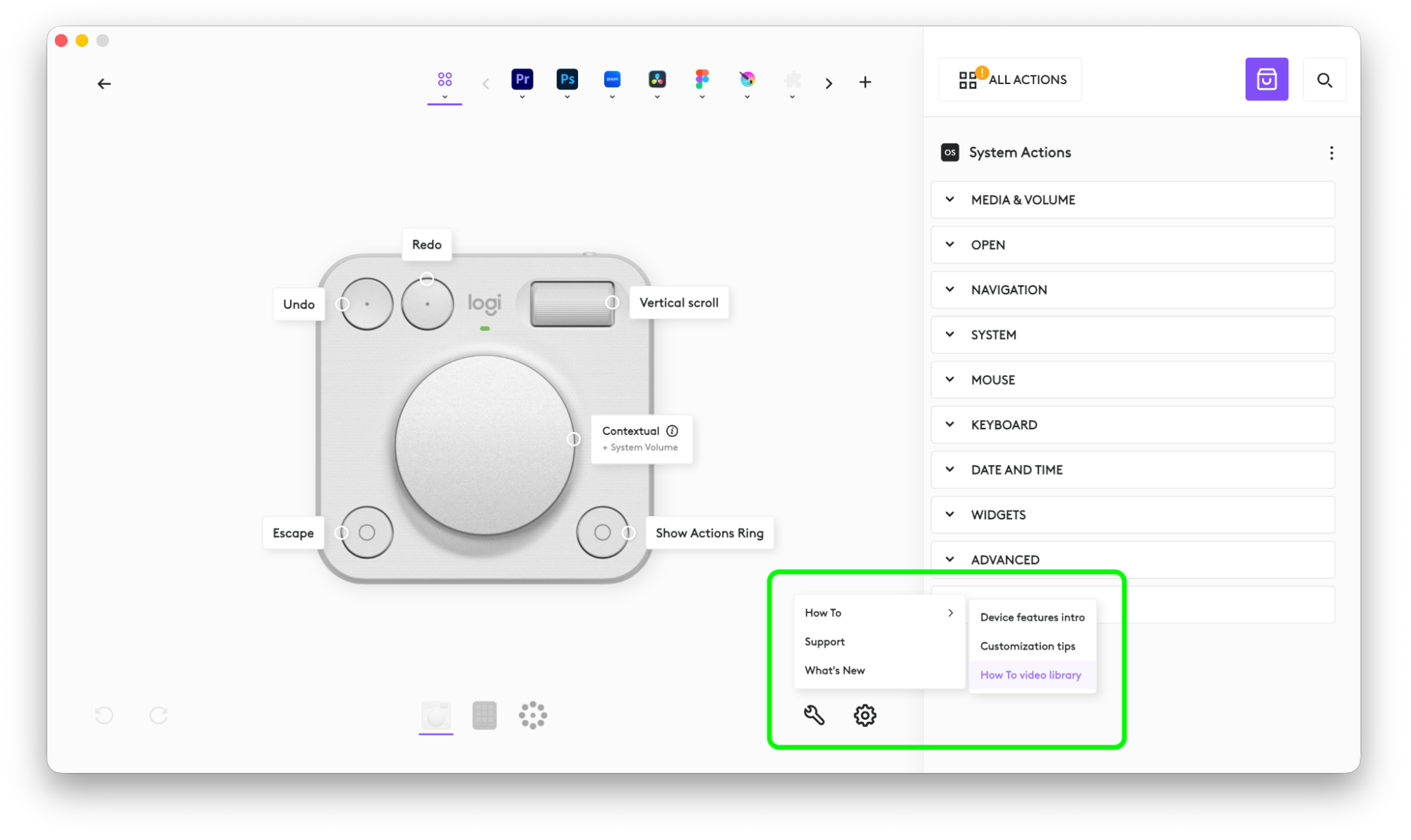
- WHY: It’s always more convenient to have a quick way to access the FAQ directly from the configuration page, as well as having a quick access to a library of video tutorials that showcase different ways to use the MX Console.
- HOW: Click on the updated “wrench” icon in the bottom part of the configuration page to get access to:
HOW TO
- DEVICE FEATURES INTRO: Initial information about your device.
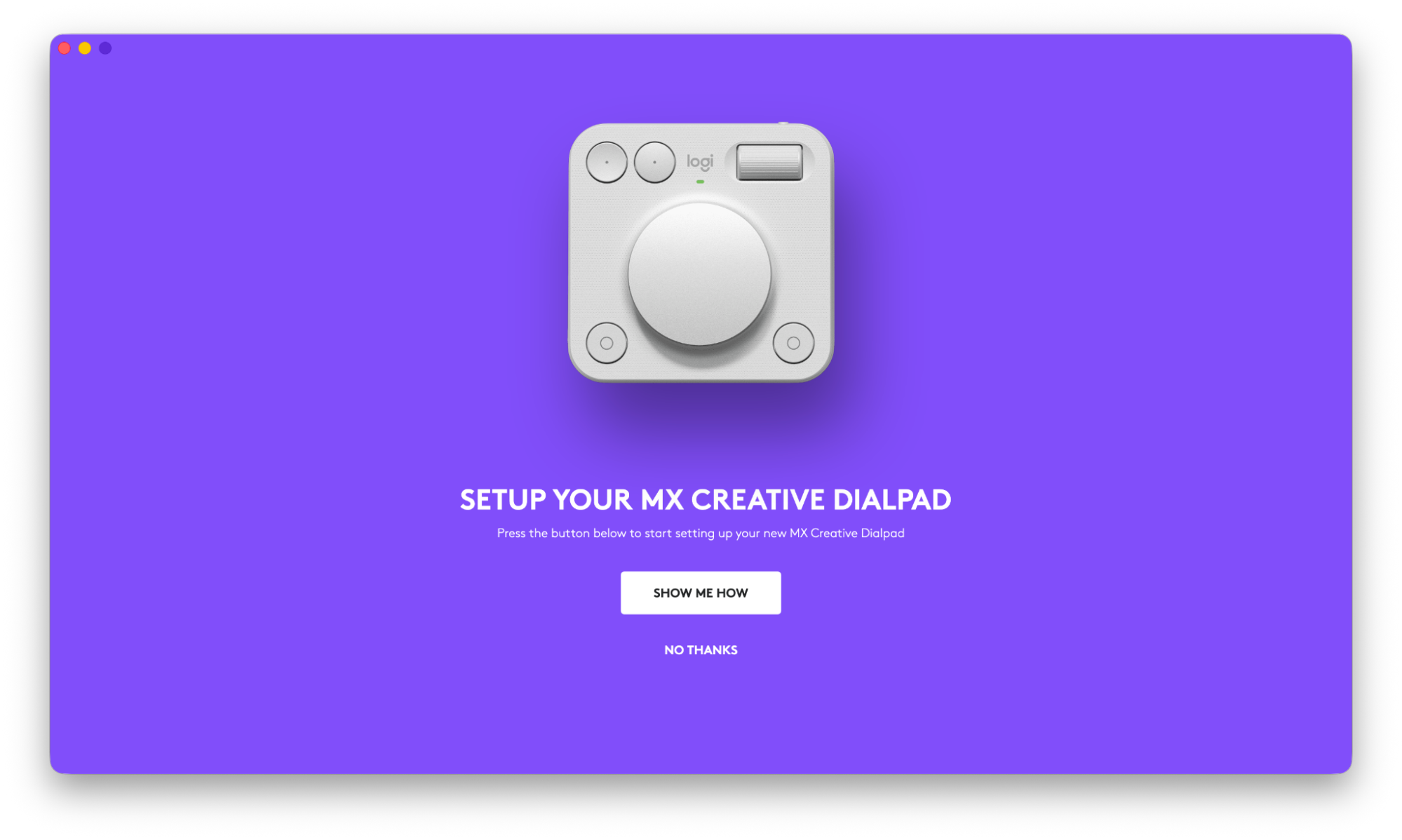
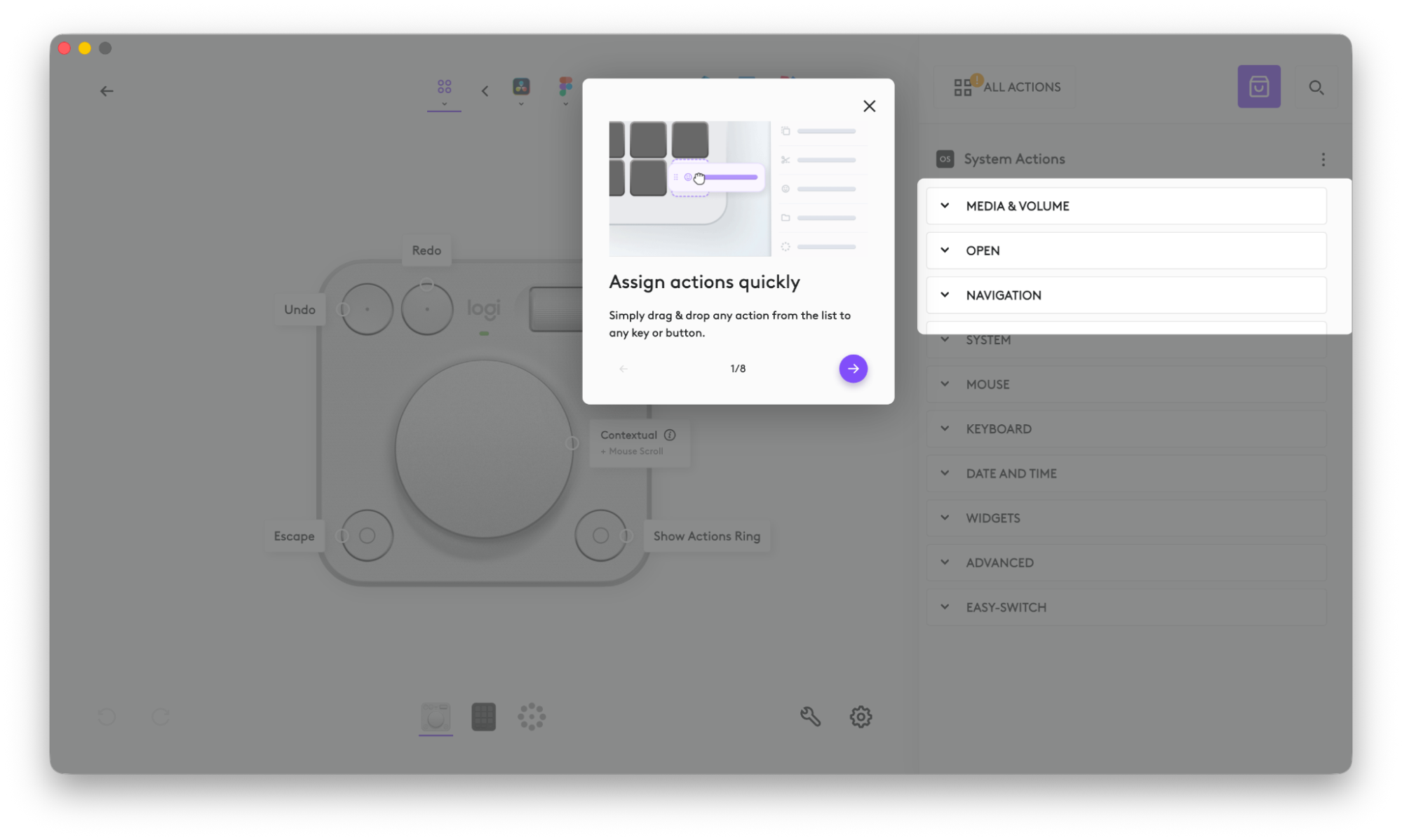
- CUSTOMISATION TIPS: Learn how to configure your device.
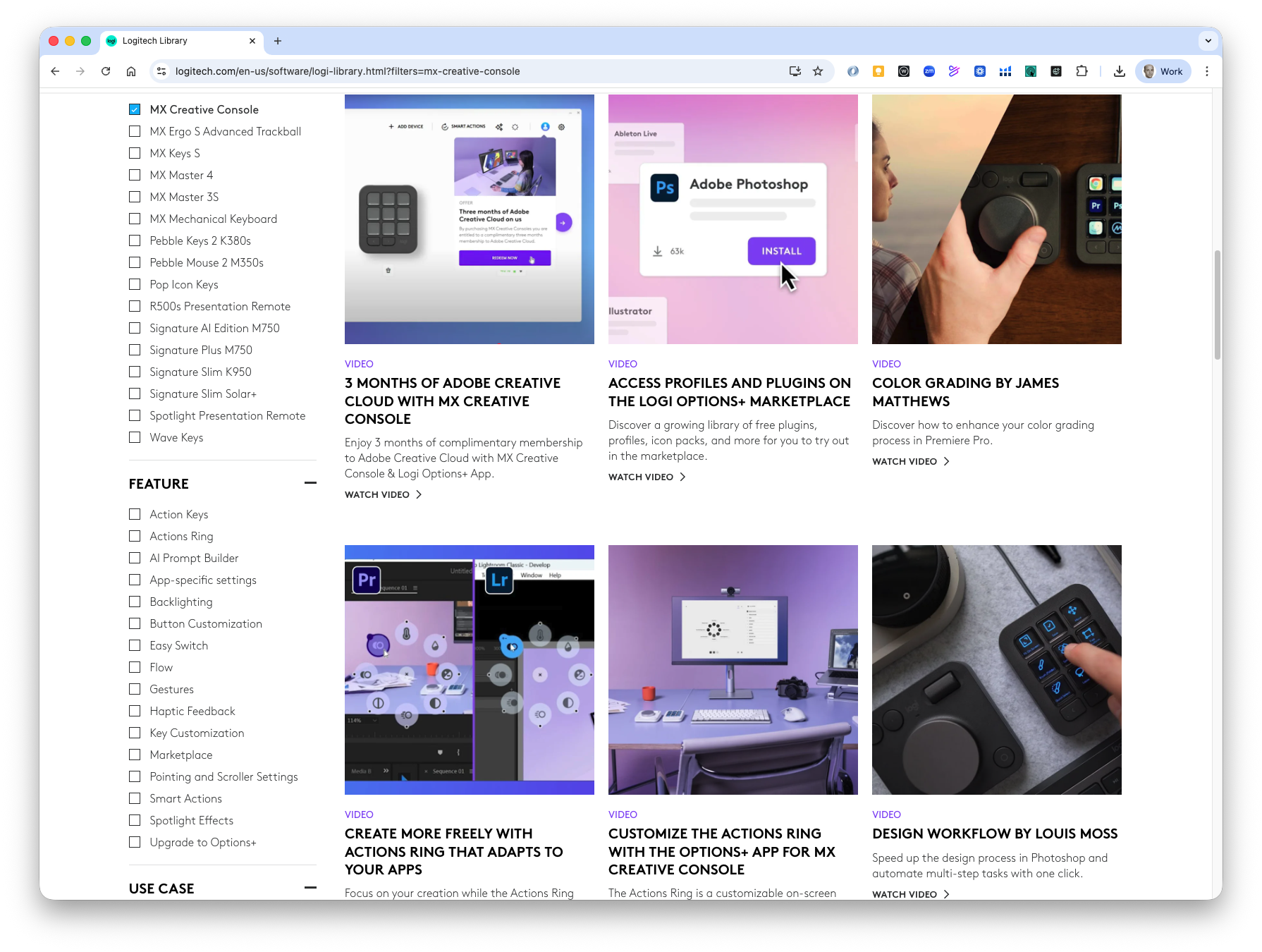
- HOW TO VIDEO LIBRARY: link to a library of video tutorials for the MX Console in various applications.
SUPPORT
- A direct link to logitech’s MX Console support site
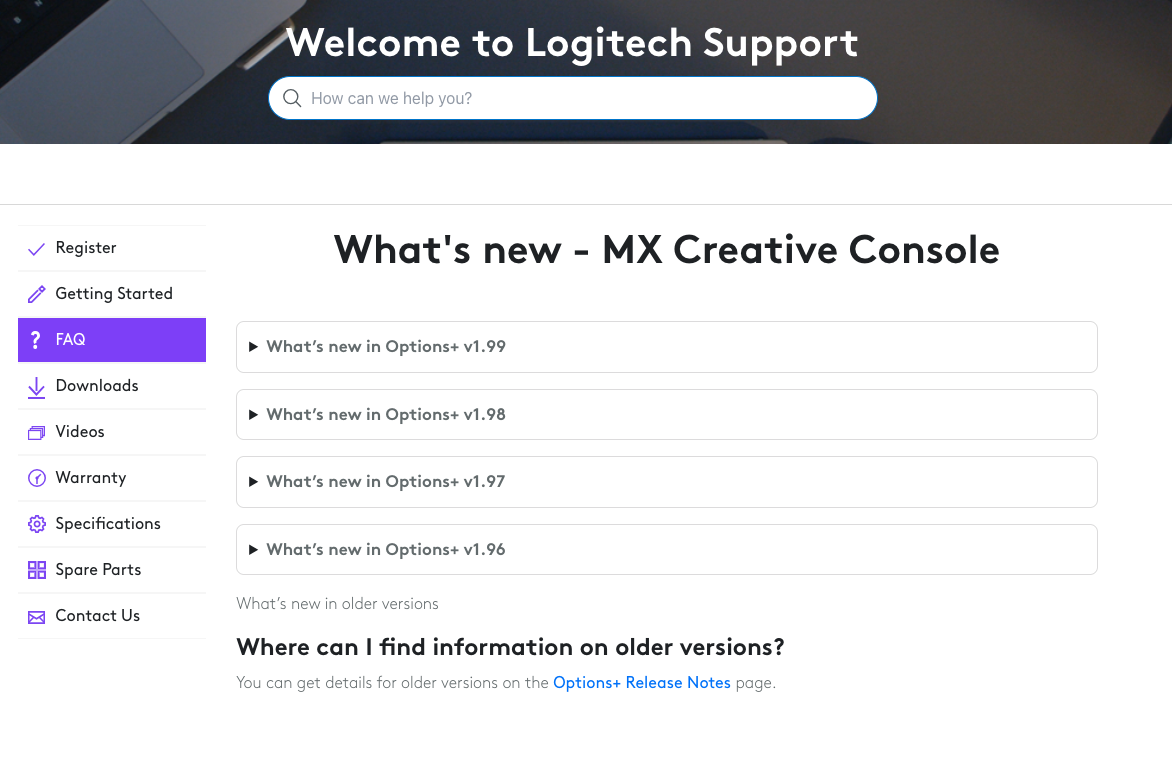
WHAT’s NEW
- A direct link to an description of the improvements for each release.
Improvements in Icon editor and Overall UI improvements:
| [Consoles UI] Text on the Update button is aligned vertically on plugin's update pop-up in some languages |
| [Console UI] There is no space between the Plugin name and New version columns on the Update pop-up in Finnish/Japanese |
| [Console UI] Feature Tour pop-up appears on top of Consoles UI onboarding when navigating quickly |
| [Custom Adjustment] [Mouse action] When assign the mouse actions to custom adjustment , save button is not enabled. |
| [Console UI] The "Adapt to app" dialog closes too quickly |
| [Pagination] Delete Page text is Wrapped and font size looks small. |
| [Console UI] Only 3 plugins are visible at a time in Onboarding plugin installation list |
| [Console UI] Incorrect reference to long press functionality on Multi-toggle action |
| Error "Application has just restarted" appears after updating Smart Actions plugin with Smart action panel open |
| [Switch Profile] Plugin dropddown get hidden/exits the main UI. |
| [Console UI] Rename the "ooops something went wrong" LPS restart error |
| [Adapt to app OFF] Newly added profile is not displayed on Actions ring overlay even though this profile is selected in the list of profiles |
| [LPS] Restart LPS completed popup status shows before LPS actually restarts (loading) |
| [Consoles UI] Icon is jumping while being dragged to the margins in Icon Editor |
| [Console UI] Icon Editor Refactoring & Improvements |
| [Console UI] Actions are not added to Actions Ring folder when clicking the "Add an action" then choosing an action |
What’s new in Options+ v1.98
Released in November 2025 (See Options+ Release Notes)
What's new in Options+ v1.98
-
Improved icon editor
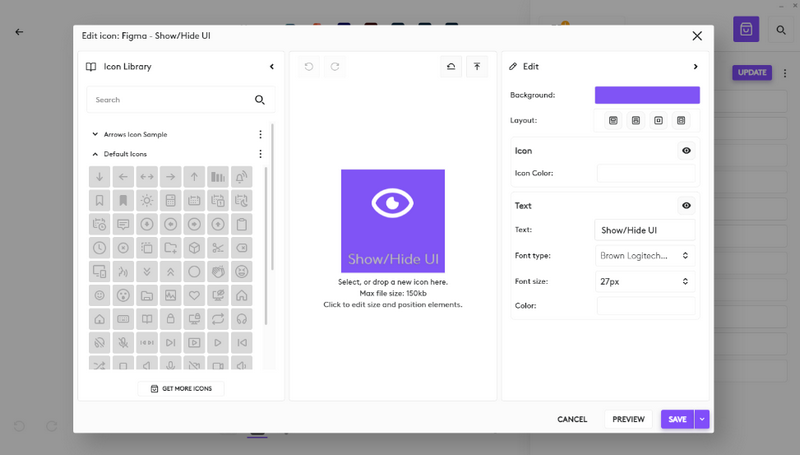
- WHY: We fixed many issues that were occuring with the icon editor.
- HOW: You should now be able to select background color, change the icon, icon color, text, and the position and arrangement.
-
Change many settings with a (few) clicks
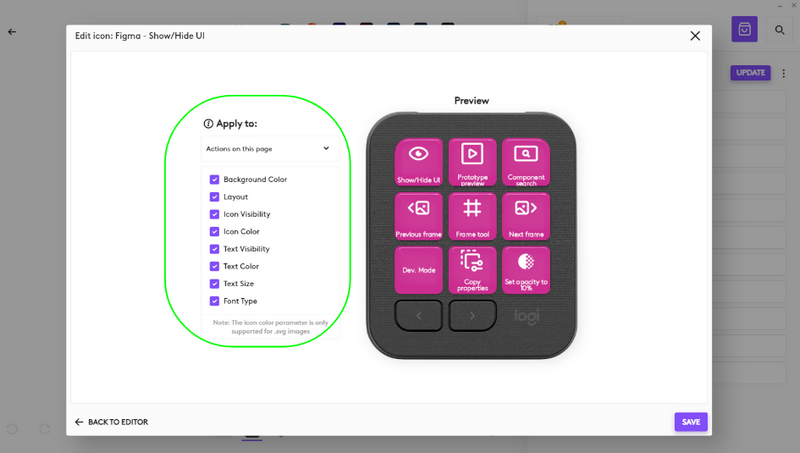
- WHY: Many users wanted to customize icons and colors.
- HOW: Customization required a lot of work and many steps. You can now use the PREVIEW button to apply only some changes to all icons in a page or profile.
- Example: Use the layout to put text above the icon in one action on all keys.
-
You can now re-arrange applications' profiles
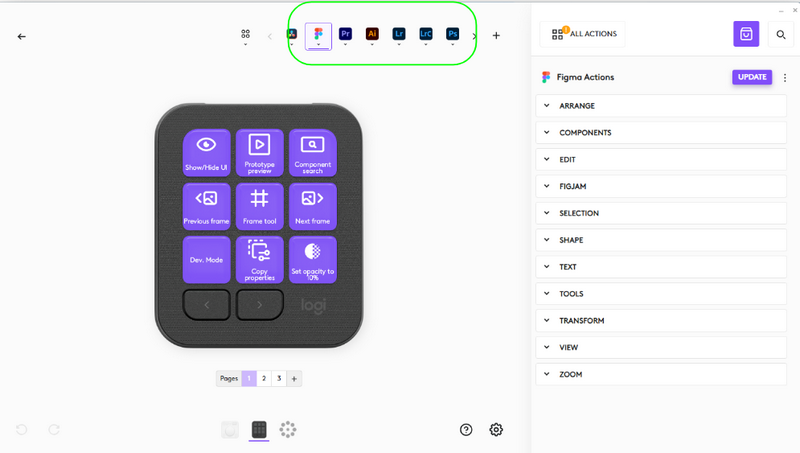
- WHY: Until now, application profiles were visualized in the order of creation, which can be annoying.
- HOW: Now you can simply click and drag to re-arrange profiles.
-
Fixed global slider for dial/roller adjustments
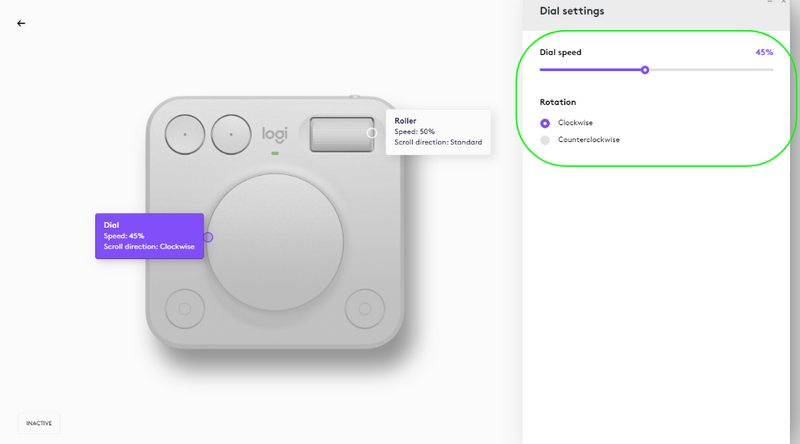
- WHY: Previously, when you tried to change the settings (ex. sensitivity) of your dial or roller by changing the slider in the setting, occasionally nothing would change.
- HOW: You can now use it to decide globally how your dial behaves (across all adjustments). Specifically, you are able to make it slower.
-
Added slider to adjust (some) plugins’ adjustments
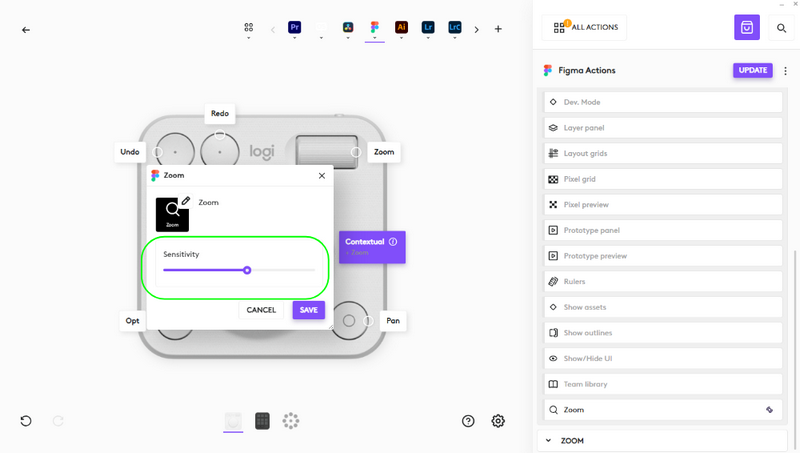
- WHY: The speed of some (shortcut) adjustments were not configurable individually.
- HOW: Map an adjustment (ex: zoom in figma) to your dial and you can try to adjust the speed of it.
- NOTE: This value will be multiplied by the global setting for the dial (see previous image).
-
Added quick way to access recommended actions from empty key
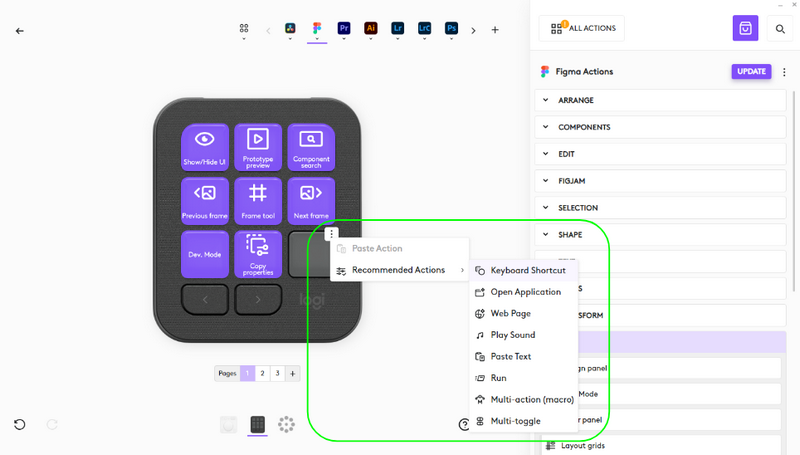
- HOW: Use the 3-dots menu on an empty key in order to quickly access recommended actions.
- NOTE: You can still use the full list of actions from the right action panel.
What’s new in Options+ v1.97
(See also Options+ Release Notes for 1.97)
What’s new in Options+ v1.97
-
Choose your layout/language (for plugins with shortcuts)
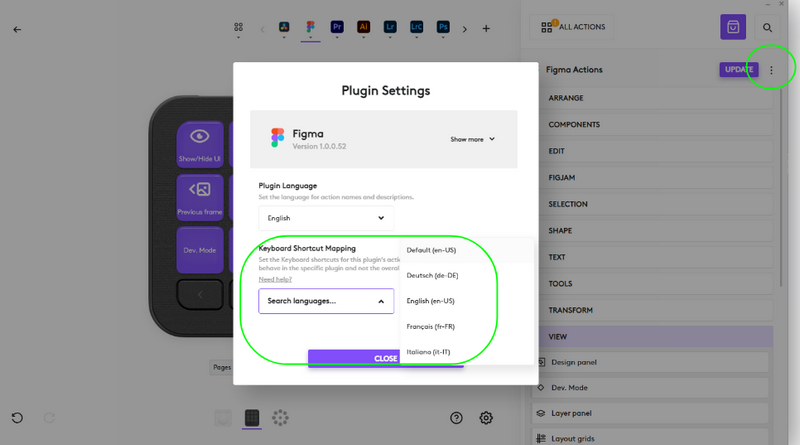
- WHY: Sometimes, when the only way to interact with an app is to send keyboard shortcuts, the app’s language or the type of keyboard layout can affect the results.
- HOW: For some plugins that are based on keyboard shortcuts, you can now select from a list of supported language’s layouts: If you experience issues in some actions (ex: zoom, scroll), try to change that to match the layout of your keyboard or your app's language.
- NOTE: By default, the system will select the layout that corresponds to the language you have chosen in Options+, but this can be manually changed.
- You can find more information here.
What’s new in Options+ v1.96
(See also Options+ Release Notes for 1.96)
What’s new in Options+ v1.96
-
More robust reconnection logic for Dialpad
- WHY: Some people complained of a non-responsive dialpad, especially when waking up the device or when the computer was coming out of sleep.
- HOW: We refactored the Connection logic to solve multiple issues that could arise during device reconnections, so it should now be more responsive and solid.
Where can I find information on older versions?
You can get details for older versions on the Options+ Release Notes page.
หมายเหตุสำคัญ: Logitech ไม่รองรับหรือบำรุงรักษาเครื่องมืออัปเดตเฟิร์มแวร์อีกต่อไปแล้ว เราขอแนะนำให้ใช้ Logi Options+ สำหรับอุปกรณ์ Logitech ที่รองรับ เราพร้อมให้ความช่วยเหลือคุณในระหว่างการเปลี่ยนแปลงนี้
หมายเหตุสำคัญ: Logitech ไม่รองรับหรือบำรุงรักษา Logitech Preference Manager อีกต่อไปแล้ว เราขอแนะนำให้ใช้ Logi Options+ สำหรับอุปกรณ์ Logitech ที่รองรับ เราพร้อมให้ความช่วยเหลือคุณในระหว่างการเปลี่ยนแปลงนี้
หมายเหตุสำคัญ: Logitech ไม่รองรับหรือบำรุงรักษา Logitech Control Center อีกต่อไปแล้ว เราขอแนะนำให้ใช้ Logi Options+ สำหรับอุปกรณ์ Logitech ที่รองรับ เราพร้อมให้ความช่วยเหลือคุณในระหว่างการเปลี่ยนแปลงนี้
หมายเหตุสำคัญ: Logitech ไม่รองรับหรือบำรุงรักษา Logitech Connection Utility อีกต่อไปแล้ว เราขอแนะนำให้ใช้ Logi Options+ สำหรับอุปกรณ์ Logitech ที่รองรับ เราพร้อมให้ความช่วยเหลือคุณในระหว่างการเปลี่ยนแปลงนี้
หมายเหตุสำคัญ: Logitech ไม่รองรับหรือบำรุงรักษา Unifying Software อีกต่อไปแล้ว เราขอแนะนำให้ใช้ Logi Options+ สำหรับอุปกรณ์ Logitech ที่รองรับ เราพร้อมให้ความช่วยเหลือคุณในระหว่างการเปลี่ยนแปลงนี้
หมายเหตุสำคัญ: ซอฟต์แวร์ SetPoint ไม่รองรับหรือดูแลรักษาโดย Logitech อีกต่อไป เราขอแนะนำให้ใช้ Logi Options+ สำหรับอุปกรณ์ Logitech ที่รองรับ เราพร้อมให้ความช่วยเหลือคุณในระหว่างการเปลี่ยนแปลงนี้
คำถามที่พบบ่อย
ไม่มีสินค้าสำหรับส่วนนี้
ไม่มีรายการดาวน์โหลดสำหรับผลิตภัณฑ์นี้
ไม่มีการดาวน์โหลดสำหรับเวอร์ชันนี้
Compatible Product
