To pair your device to a second computer:
- Press and hold the Easy-SwitchTM button (F1-F3) that you will use for the second computer via wireless connectivity for three seconds. This will put your keyboard in pairing mode and the LED light will start blinking fast.
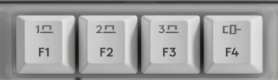
- Choose how you want to connect your keyboard to the second computer.
-
Via Bluetooth
Open the Bluetooth settings on your computer to complete the pairing. You may refer to Bluetooth - Pairing and Troubleshooting. -
Via Logi Bolt receiver
1. Plug the Logi Bolt receiver into the USB port of your computer. Open Logi Options+.
3. Click + ADD DEVICE and select Logi Bolt receiver.
4. Follow the on-screen instructions to pair.
-
Via Bluetooth
- You may also connect to your second computer via corded connectivity. You can trigger this automatically by plugging a cable to the Alto Keys and another side to your second computer.
- Once paired, a short press on the Easy-SwitchTM button will allow you to switch channels and F4 for the corded channel.
Önemli Not: Ürün Yazılımı Güncelleme Aracı artık Logitech tarafından desteklenen veya bakımı yapılan bir ürün değildir. Desteklenen Logitech cihazlarınız için Logi Options+ kullanmanızı tavsiye ederiz. Bu geçiş sürecinde size yardımcı olmak için buradayız.
Önemli Not: Logitech Preference Manager artık Logitech tarafından desteklenmiyor veya bakımı sağlanmıyor. Desteklenen Logitech cihazlarınız için Logi Options+ kullanmanızı tavsiye ederiz. Bu geçiş sürecinde size yardımcı olmak için buradayız.
Önemli Not: Logitech Control Center, artık Logitech tarafından desteklenmiyor veya bakımı sağlanmıyor. Desteklenen Logitech cihazlarınız için Logi Options+ kullanmanızı tavsiye ederiz. Bu geçiş sürecinde size yardımcı olmak için buradayız.
Önemli Not: Logitech Connection Utility artık Logitech tarafından desteklenmiyor veya bakımı sağlanmıyor. Desteklenen Logitech cihazlarınız için Logi Options+ kullanmanızı tavsiye ederiz. Bu geçiş sürecinde size yardımcı olmak için buradayız.
Önemli Not: Unifying Yazılımı artık Logitech tarafından desteklenmiyor veya bakımı sağlanmıyor. Desteklenen Logitech cihazlarınız için Logi Options+ kullanmanızı tavsiye ederiz. Bu geçiş sürecinde size yardımcı olmak için buradayız.
Önemli Not: SetPoint yazılımı artık Logitech tarafından desteklenmemekte veya bu yazılımın bakımını yapmamaktadır. Desteklenen Logitech cihazlarınız için Logi Options+ kullanmanızı tavsiye ederiz. Bu geçiş sürecinde size yardımcı olmak için buradayız.
Sıkça Sorulan Sorular
Bu bölüme uygun ürün yok
Bu Ürün için Güncelleme yok
Bu Sürüm için İndirme yok.
Compatible Product
