If your Brio 500/501 webcam does not work correctly on your computer (both Windows and Mac) and you have Microsoft Teams installed, please make sure you have the latest firmware update installed on your webcam.
To update the firmware, first make sure Logi Tune is installed — you can download it here. After Logi Tune is installed, follow these steps:
- If MS Teams is installed, make sure to close the application.
- If MS teams was running while you had the Webcam plugged in, please unplug it and plug it back in before you start updating the firmware.
- Open Logi Tune. It will prompt you update your device, as shown:
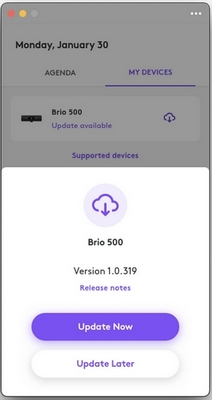
- Select Update Now and wait for the update to complete. Please do not use the webcam or unplug it while it's updating.
重要提示:罗技不再对固件更新工具提供支持或维护。强烈推荐您将 Logi Options+ 用于受支持的罗技设备。在此过渡期间,我们将为您提供帮助。
重要提示:罗技不再对 Logitech Preference Manager 提供支持或维护。强烈推荐您将 Logi Options+ 用于受支持的罗技设备。在此过渡期间,我们将为您提供帮助。
重要提示:罗技不再对 Logitech Control Center 提供支持或维护。强烈推荐您将 Logi Options+ 用于受支持的罗技设备。在此过渡期间,我们将为您提供帮助。
重要提示:罗技不再对 Logitech Connection Utility 提供支持或维护。强烈推荐您将 Logi Options+ 用于受支持的罗技设备。在此过渡期间,我们将为您提供帮助。
重要提示:罗技不再对 Unifying 软件提供支持或维护。强烈推荐您将 Logi Options+ 用于受支持的罗技设备。在此过渡期间,我们将为您提供帮助。
重要提示:罗技不再支持或维护 SetPoint 软件。强烈推荐您将 Logi Options+ 用于受支持的罗技设备。在此过渡期间,我们将为您提供帮助。
常问问题
此部分没有可用的产品
没有此产品的相关下载内容
没有此版本的相关下载内容。
Compatible Product
