If you installed one of the beta versions of MIXLINE and then upgrade to the public 1.0 release of MIXLINE, you might encounter an issue where MIXLINE is unexpectedly uninstalled after you reboot your computer. A hotfix is coming to address the issue for the future.
Until then, if you’re experiencing this issue there are some manual steps that you can take to resolve it:
- Download the 1.0 installer. The file should be MIXLINE-1.0.59.3453.msi.
- Double-click on MIXLINE-1.0.59.3453.msi.
- You'll see a dialog prompting you to locate the MSI installation package. It should reference 1.0.59.3453 under a MIXLINE\updates directory.
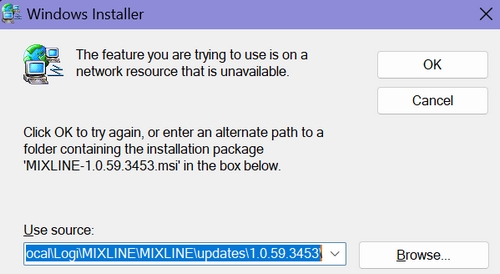
- Browse and pick the MSI file that you just double-clicked, which should be MIXLINE-1.0.59.3453.msi.
You'll see a Modify/Repair/Remove dialog box.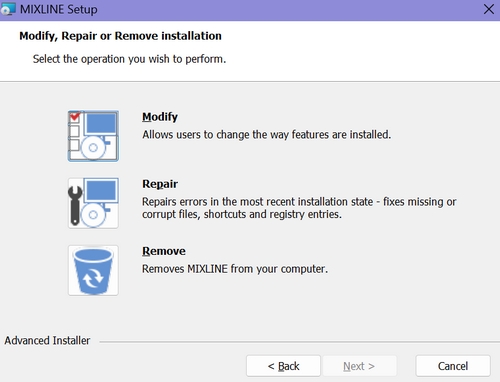
- Choose the Remove option. It will make some progress, and then you'll see an error letting you know that there's a problem with the installer.
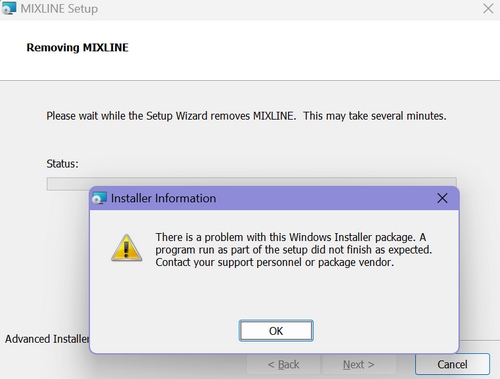
- Click OK.
- Double-click the MSI file again. This time it should install correctly.
重要提示:罗技不再对固件更新工具提供支持或维护。强烈推荐您将 Logi Options+ 用于受支持的罗技设备。在此过渡期间,我们将为您提供帮助。
重要提示:罗技不再对 Logitech Preference Manager 提供支持或维护。强烈推荐您将 Logi Options+ 用于受支持的罗技设备。在此过渡期间,我们将为您提供帮助。
重要提示:罗技不再对 Logitech Control Center 提供支持或维护。强烈推荐您将 Logi Options+ 用于受支持的罗技设备。在此过渡期间,我们将为您提供帮助。
重要提示:罗技不再对 Logitech Connection Utility 提供支持或维护。强烈推荐您将 Logi Options+ 用于受支持的罗技设备。在此过渡期间,我们将为您提供帮助。
重要提示:罗技不再对 Unifying 软件提供支持或维护。强烈推荐您将 Logi Options+ 用于受支持的罗技设备。在此过渡期间,我们将为您提供帮助。
重要提示:罗技不再支持或维护 SetPoint 软件。强烈推荐您将 Logi Options+ 用于受支持的罗技设备。在此过渡期间,我们将为您提供帮助。
常问问题
此部分没有可用的产品
没有此产品的相关下载内容
没有此版本的相关下载内容。
Compatible Product
