iRacing has full support for TRUEFORCE through the game’s integration. You will first need to decide which type of TRUEFORCE effects you prefer to use and then edit one of the game’s files to alter this setting.
iRacing has two types of TRUEFORCE effects:
- Physics-based effects, such as a pulse that you feel when hitting the rev limiter or vibrations from tire scrub as you slide
- Engine note effects
You can only have one of these effects active at a time. Please follow the instructions below to help you choose and adjust your selected TRUEFORCE effect.
Choose and Adjust TRUEFORCE Effects
- Navigate to the folder C:\Users\{USERNAME}\Documents\iRacing. You will see a file called app.ini.
- Right-click on that file, hover over Open With and then click Notepad.
- In the Notepad window, scroll down the settings list until you find the section titled [Force Feedback]. There are two settings at the bottom of the section:
- trueForceVibeGain_dB=
- trueForceVibePhysics=
- For trueForceVibePhysics=, you can choose which type of TRUEFORCE effect to use by editing the number at the end of the line.
- To enable Engine Note effects, change it to 0.
- To allow Physics-based effects, change it to 1.
- The trueForceVibeGain_dB= setting lets you control the intensity of the TRUEFORCE effects by altering its value. This value can range from -90 to 20. Our recommendation is to keep this setting somewhere between -40 (weak) and 5 (strong), depending on your preference.
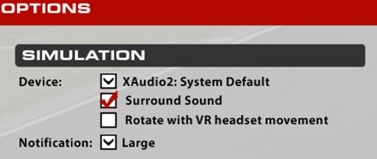
Additionally, our recommendation is to use XAudio2 for your chosen audio device in iRacing’s Options menu on the Sound tab. The combination of TRUEFORCE and XAudio2 will help create a more immersive experience.
重要提示:罗技不再对固件更新工具提供支持或维护。强烈推荐您将 Logi Options+ 用于受支持的罗技设备。在此过渡期间,我们将为您提供帮助。
重要提示:罗技不再对 Logitech Preference Manager 提供支持或维护。强烈推荐您将 Logi Options+ 用于受支持的罗技设备。在此过渡期间,我们将为您提供帮助。
重要提示:罗技不再对 Logitech Control Center 提供支持或维护。强烈推荐您将 Logi Options+ 用于受支持的罗技设备。在此过渡期间,我们将为您提供帮助。
重要提示:罗技不再对 Logitech Connection Utility 提供支持或维护。强烈推荐您将 Logi Options+ 用于受支持的罗技设备。在此过渡期间,我们将为您提供帮助。
重要提示:罗技不再对 Unifying 软件提供支持或维护。强烈推荐您将 Logi Options+ 用于受支持的罗技设备。在此过渡期间,我们将为您提供帮助。
重要提示:罗技不再支持或维护 SetPoint 软件。强烈推荐您将 Logi Options+ 用于受支持的罗技设备。在此过渡期间,我们将为您提供帮助。
常问问题
此部分没有可用的产品
没有此产品的相关下载内容
没有此版本的相关下载内容。
Compatible Product
