If your device becomes unpaired or you receive a replacement LIGHTSPEED wireless adapter, do the following to pair your device:
-
Turn your headset ON in LIGHTSPEED mode.
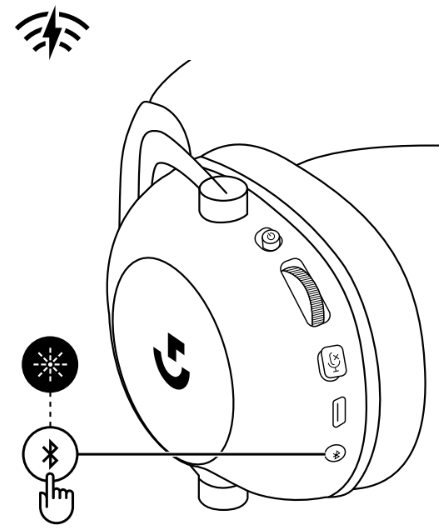
-
Plug the LIGHTSPEED receiver into the host device. (If it’s already plugged in, un-plug and then plug it back in.)
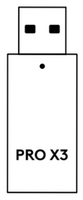
-
Remove the left earpad cushion.
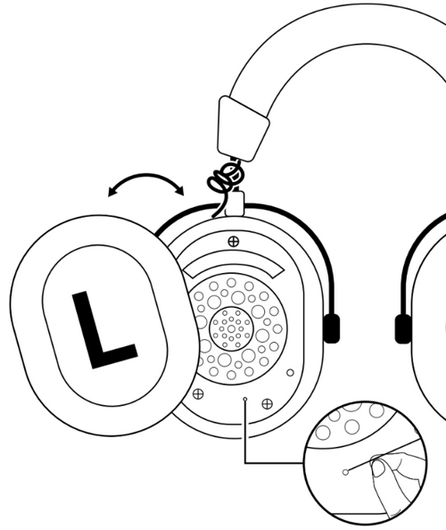
- Use a paperclip to long press the headset pairing button. The headset will blink and chime.
-
Use a paperclip to press the LIGHTSPEED receiver pairing button. The light on the adapter will blink.
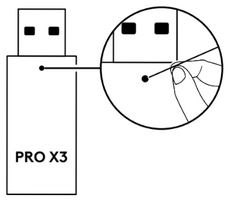
- Wait 10-15 seconds for pairing to complete. Blinking will stop on both the headset and adapter and you'll hear a chime in the headset to indicate pairing is complete.
重要須知:韌體更新工具不再由 Logitech 支援或維護。我們強烈建議為支援的 Logitech 裝置使用 Logi Options+。在此過渡期間,我們會隨時為您提供協助。
重要須知:Logitech Preference Manager 已不再由 Logitech 支援或維護。我們強烈建議為支援的 Logitech 裝置使用 Logi Options+。在此過渡期間,我們會隨時為您提供協助。
重要須知:Logitech Control Center 已不再由 Logitech 支援或維護。我們強烈建議為支援的 Logitech 裝置使用 Logi Options+。在此過渡期間,我們會隨時為您提供協助。
重要須知:Logitech Connection Utility 已不再由 Logitech 支援或維護。我們強烈建議為支援的 Logitech 裝置使用 Logi Options+。在此過渡期間,我們會隨時為您提供協助。
重要須知:Unifying Software 已不再由 Logitech 支援或維護。我們強烈建議為支援的 Logitech 裝置使用 Logi Options+。在此過渡期間,我們會隨時為您提供協助。
重要須知:羅技不再支援或維護 SetPoint 軟體。我們強烈建議為支援的 Logitech 裝置使用 Logi Options+。在此過渡期間,我們會隨時為您提供協助。
常見問答集
沒有適用於此區段的產品
沒有適用於此產品的下載項目
沒有適用於此版本的下載項目。
Compatible Product
