You can check your Jaybird RUN earbuds battery status and your charging case battery status in a few different ways. Here’s how you can view the earbuds and charge case individually.
Your Jaybird RUN earbuds
You can check your Jaybird RUN earbuds battery status in the following ways:
- Out of case you will hear a battery status notification as soon as the earbuds turn on.
- During use you will hear battery status notifications at 20% battery remaining and when the battery reaches less than 10%.
- The Jaybird App will indicate your left and right earbud battery status to within 1%.
- The right earbud is expected to lose battery faster than the left as the right controls the connection to the Bluetooth ® audio device as well as the left earbud. A full charge will still give you 4 hours of playtime.
Your Jaybird RUN charging case
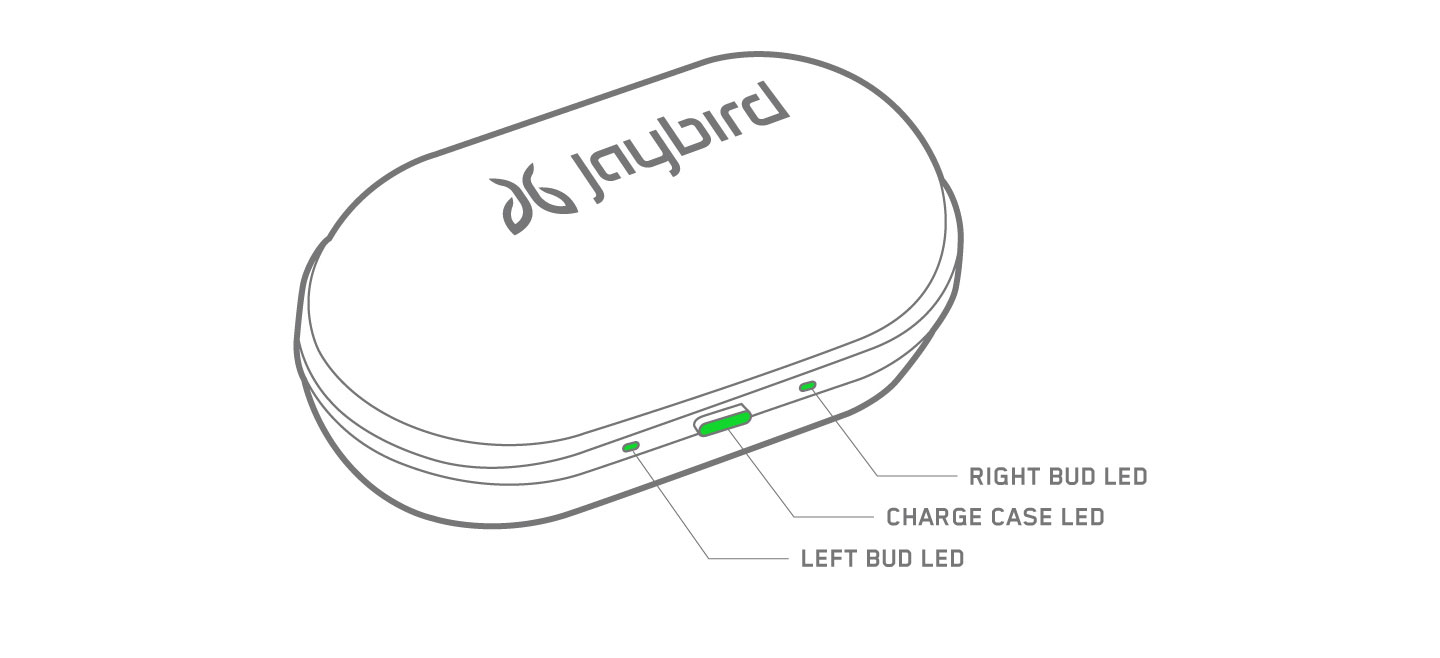
When your charge case is connected to power, the following LED indicators will display:
- Middle LED on case - Case battery status LED
- Green LED pulses = charging
- Green LED solid = fully charged
- Left and Right LED’s on case - Left and right earbud battery status LED’s if earbuds are in the case
- Green LED pulses = charging
- Green LED solid = fully charged
- Green LED pulses = charging
- Green LED solid = fully charged
When your charge case is not connected to power, on opening the case, the following LED indicators will display:
- Middle LED on case - Case battery status LED
- Green LED solid for 10 sec = Battery ok (more than 1h of playtime left in charge case)
- Red LED solid for 10 sec = Low battery (less than 1h of playtime left in charge case)
- Left and Right LED’s on case - Left and right earbud battery status LED’s if earbuds are in the case
- Green LED pulses = Charging
- Green LED solid = Fully charged
- Green LED solid for 10 sec = Battery ok (more than 1h of playtime left in charge case)
- Red LED solid for 10 sec = Low battery (less than 1h of playtime left in charge case)
- Green LED pulses = Charging
- Green LED solid = Fully charged
重要須知:韌體更新工具不再由 Logitech 支援或維護。我們強烈建議為支援的 Logitech 裝置使用 Logi Options+。在此過渡期間,我們會隨時為您提供協助。
重要須知:Logitech Preference Manager 已不再由 Logitech 支援或維護。我們強烈建議為支援的 Logitech 裝置使用 Logi Options+。在此過渡期間,我們會隨時為您提供協助。
重要須知:Logitech Control Center 已不再由 Logitech 支援或維護。我們強烈建議為支援的 Logitech 裝置使用 Logi Options+。在此過渡期間,我們會隨時為您提供協助。
重要須知:Logitech Connection Utility 已不再由 Logitech 支援或維護。我們強烈建議為支援的 Logitech 裝置使用 Logi Options+。在此過渡期間,我們會隨時為您提供協助。
重要須知:Unifying Software 已不再由 Logitech 支援或維護。我們強烈建議為支援的 Logitech 裝置使用 Logi Options+。在此過渡期間,我們會隨時為您提供協助。
重要須知:羅技不再支援或維護 SetPoint 軟體。我們強烈建議為支援的 Logitech 裝置使用 Logi Options+。在此過渡期間,我們會隨時為您提供協助。
常見問答集
沒有適用於此區段的產品
沒有適用於此產品的下載項目
沒有適用於此版本的下載項目。
Compatible Product
