- The Z407 may not support your source device — make sure that your device is updated to the latest version.
- Unplug the USB cable on your source device and then plug it back in again.
Troubleshooting on a Windows system:
- In Device Manager, under Sound, video and game controllers, make sure the audio driver is updated to the latest version:
Right-click “Logi Z407” and select Properties.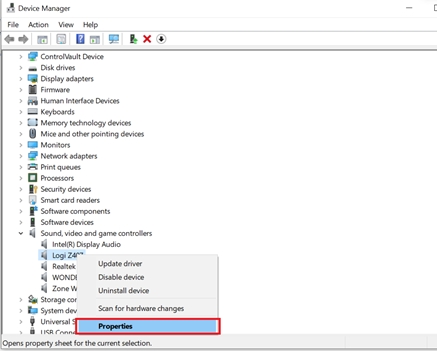
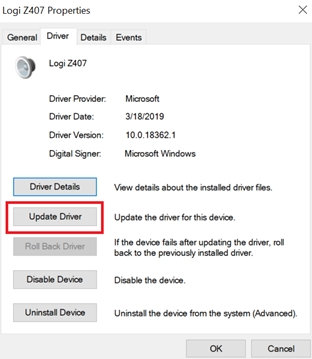
- Click Update Driver and choose Search automatically for updated driver software.
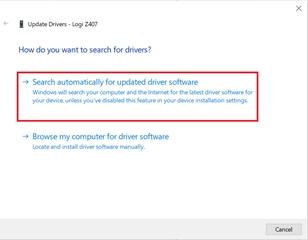
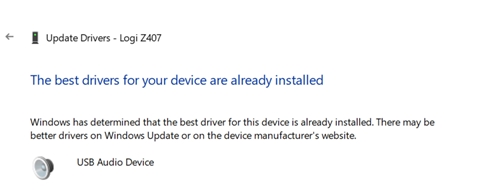
- Windows will search for and install the latest driver. If your driver is the latest version, it will appear as shown:
- Unplug your Z407. Reboot the computer and then power the Z407 back on.
- Play music from your computer to verify the music output.
重要須知:韌體更新工具不再由 Logitech 支援或維護。我們強烈建議為支援的 Logitech 裝置使用 Logi Options+。在此過渡期間,我們會隨時為您提供協助。
重要須知:Logitech Preference Manager 已不再由 Logitech 支援或維護。我們強烈建議為支援的 Logitech 裝置使用 Logi Options+。在此過渡期間,我們會隨時為您提供協助。
重要須知:Logitech Control Center 已不再由 Logitech 支援或維護。我們強烈建議為支援的 Logitech 裝置使用 Logi Options+。在此過渡期間,我們會隨時為您提供協助。
重要須知:Logitech Connection Utility 已不再由 Logitech 支援或維護。我們強烈建議為支援的 Logitech 裝置使用 Logi Options+。在此過渡期間,我們會隨時為您提供協助。
重要須知:Unifying Software 已不再由 Logitech 支援或維護。我們強烈建議為支援的 Logitech 裝置使用 Logi Options+。在此過渡期間,我們會隨時為您提供協助。
重要須知:羅技不再支援或維護 SetPoint 軟體。我們強烈建議為支援的 Logitech 裝置使用 Logi Options+。在此過渡期間,我們會隨時為您提供協助。
常見問答集
沒有適用於此區段的產品
沒有適用於此產品的下載項目
沒有適用於此版本的下載項目。
顯示所有下載
Compatible Product
