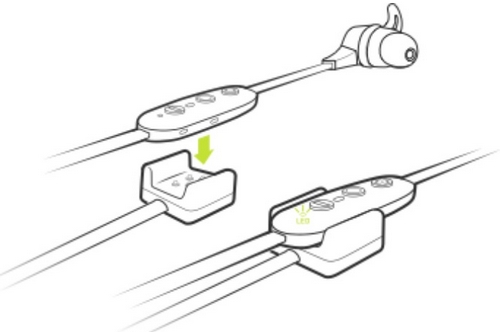
Your Jaybird X4 buds come with a directional charging clip. To charge, follow the steps below.
- Connect the charging clip to the inline remote on your X4 buds with the Micro USB connector facing away from the earpiece. You’ll notice the charging clip is tapered just like the inline remote. The wider section of the charging clip aligns with the wider section of the remote.
- Connect the other end of the USB charging cable to a USB power source.
- Limit the charge time to 2.5 hours. To get the most out of your battery it is recommended to charge the buds when you hear the ‘Charge Me’ voice prompt (about 10% battery remaining). If you’re pressed for time and only have time to partially charge your buds, you’ll get around an hour of playtime for every 10 minutes of charge. When turned on and not playing music, pressing Volume + or Volume – will announce the battery level. If you download and connect to the Jaybird app you will be able to see your battery level to within 1%.
NOTE: Make sure to check the charging source before you begin charging. We recommend using a computer as it’s the best and safest method. Anything 1 amp or less is safe. Some chargers can produce a lot more power than is needed to charge your buds, so try and avoid them.
重要須知:韌體更新工具不再由 Logitech 支援或維護。我們強烈建議為支援的 Logitech 裝置使用 Logi Options+。在此過渡期間,我們會隨時為您提供協助。
重要須知:Logitech Preference Manager 已不再由 Logitech 支援或維護。我們強烈建議為支援的 Logitech 裝置使用 Logi Options+。在此過渡期間,我們會隨時為您提供協助。
重要須知:Logitech Control Center 已不再由 Logitech 支援或維護。我們強烈建議為支援的 Logitech 裝置使用 Logi Options+。在此過渡期間,我們會隨時為您提供協助。
重要須知:Logitech Connection Utility 已不再由 Logitech 支援或維護。我們強烈建議為支援的 Logitech 裝置使用 Logi Options+。在此過渡期間,我們會隨時為您提供協助。
重要須知:Unifying Software 已不再由 Logitech 支援或維護。我們強烈建議為支援的 Logitech 裝置使用 Logi Options+。在此過渡期間,我們會隨時為您提供協助。
重要須知:羅技不再支援或維護 SetPoint 軟體。我們強烈建議為支援的 Logitech 裝置使用 Logi Options+。在此過渡期間,我們會隨時為您提供協助。
常見問答集
沒有適用於此區段的產品
沒有適用於此產品的下載項目
沒有適用於此版本的下載項目。
Compatible Product
