Yes, your Tarah Pro earbuds will turn off automatically when they are connected to your Bluetooth® audio device and have been in an idle state for 15 minutes (i.e.not playing music or in a phone call).
Your Tarah Pro will also turn off, after 15 minutes, if not connected to your Bluetooth audio device.
When the earbuds are snapped together they disconnect from your audio device and re-connect when you pull the earbuds apart. If the earbuds are left snapped together for 15 minutes or more, the earbuds will power off.
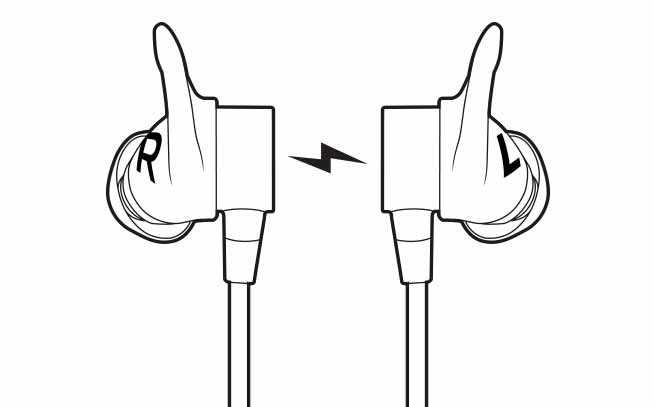
This feature helps conserve the earbuds battery when you are not actively using your earbuds.
To re-connect your earbuds after they have turned off:
- Make sure Bluetooth on your audio device is on.
- Press and hold the middle button on the inline remote until you hear an ascending “Power on” tone and the LED turns solid white.
- Once your Tarah Pro earbuds have connected to your audio device you will hear the “Connected” voice prompt.
重要須知:韌體更新工具不再由 Logitech 支援或維護。我們強烈建議為支援的 Logitech 裝置使用 Logi Options+。在此過渡期間,我們會隨時為您提供協助。
重要須知:Logitech Preference Manager 已不再由 Logitech 支援或維護。我們強烈建議為支援的 Logitech 裝置使用 Logi Options+。在此過渡期間,我們會隨時為您提供協助。
重要須知:Logitech Control Center 已不再由 Logitech 支援或維護。我們強烈建議為支援的 Logitech 裝置使用 Logi Options+。在此過渡期間,我們會隨時為您提供協助。
重要須知:Logitech Connection Utility 已不再由 Logitech 支援或維護。我們強烈建議為支援的 Logitech 裝置使用 Logi Options+。在此過渡期間,我們會隨時為您提供協助。
重要須知:Unifying Software 已不再由 Logitech 支援或維護。我們強烈建議為支援的 Logitech 裝置使用 Logi Options+。在此過渡期間,我們會隨時為您提供協助。
重要須知:羅技不再支援或維護 SetPoint 軟體。我們強烈建議為支援的 Logitech 裝置使用 Logi Options+。在此過渡期間,我們會隨時為您提供協助。
常見問答集
沒有適用於此區段的產品
沒有適用於此產品的下載項目
沒有適用於此版本的下載項目。
Compatible Product
