If you’ve added analog switches on your G512 X and they’re not working, check the following:
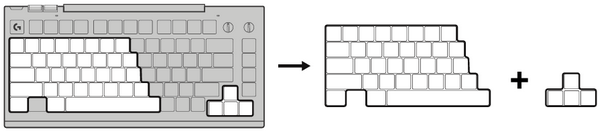
- You might have placed them outside of the analog areas.
-
There are two areas where analog switches can work. They are recognizable with the colored patterns painted on the keyplate and in the Analog switches page in G HUB.
-
- You didn’t scan the keyboard after placing your analog switches. The Scan function can be activated by three different methods. Click here to learn more about scan mode.
- When you swap your switches, your G512 X should be unplugged. When you plug it back in, the G512 X launches an automatic scan.
- Use the hard-coded button at the back of your G512 X to launch a scan anytime.
- In G HUB, press SCAN in the Analog switches page.
- Your analog switches may not be compatible with your G512 X:
- Verify that the magnet on your switch is placed at the center of it. If it is on the sides, it is not compatible with this keyboard.
Important Notice: The Firmware Update Tool is no longer supported or maintained by Logitech. We highly recommend using Logi Options+ for your supported Logitech devices. We are here to assist you during this transition.
Important Notice: The Logitech Preference Manager is no longer supported or maintained by Logitech. We highly recommend using Logi Options+ for your supported Logitech devices. We are here to assist you during this transition.
Important Notice: The Logitech Control Center is no longer supported or maintained by Logitech. We highly recommend using Logi Options+ for your supported Logitech devices. We are here to assist you during this transition.
Important Notice: The Logitech Connection Utility is no longer supported or maintained by Logitech. We highly recommend using Logi Options+ for your supported Logitech devices. We are here to assist you during this transition.
Important Notice: The Unifying Software is no longer supported or maintained by Logitech. We highly recommend using Logi Options+ for your supported Logitech devices. We are here to assist you during this transition.
Important Notice: The SetPoint software is no longer supported or maintained by Logitech. We highly recommend using Logi Options+ for your supported Logitech devices. We are here to assist you during this transition.
Frequently Asked Questions
There are no products available for this section
There are no Downloads for this Product
There are no Downloads for this Version.
Compatible Product
