The G512 X lets you swap all the switches. Out of the box, the G512 X is
fully equipped with mechanical switches and you can swap them with all types
of
mechanical switches (3 or 5 pins).
The left zone of the G512 X, as well as the four arrow keys, are equipped
with a new sensor technology that lets you swap between mechanical
switches and analog switches.
The G512 X comes with nine analog switches located inside the keyboard’s top compartment. These GATERON switches are designed with a central magnet. You can use any other analog switches from GATERON or other brands that use the same magnet position.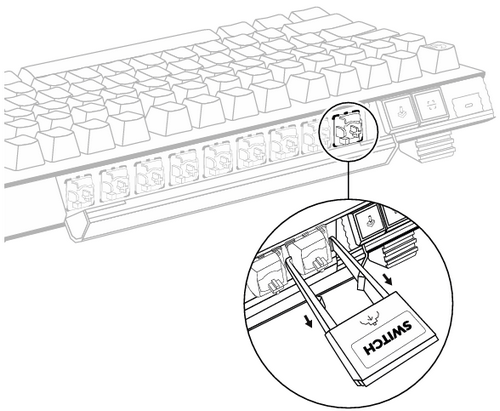
IMPORTANT:
- When swapping from mechanical to analog switches, you'll need to perform a scan of your G512 X in order for the analog switches to be recognized and activated. Click here to learn more about scanning.
- When you swap your switches, the G512 X should be unplugged. Also, when you replug, we recommended not pressing any of the keys.
- Make sure that the terminals/connectors of the switch align correctly with the keyboard when you insert the switch into the keyboard.
Important Notice: The Firmware Update Tool is no longer supported or maintained by Logitech. We highly recommend using Logi Options+ for your supported Logitech devices. We are here to assist you during this transition.
Important Notice: The Logitech Preference Manager is no longer supported or maintained by Logitech. We highly recommend using Logi Options+ for your supported Logitech devices. We are here to assist you during this transition.
Important Notice: The Logitech Control Center is no longer supported or maintained by Logitech. We highly recommend using Logi Options+ for your supported Logitech devices. We are here to assist you during this transition.
Important Notice: The Logitech Connection Utility is no longer supported or maintained by Logitech. We highly recommend using Logi Options+ for your supported Logitech devices. We are here to assist you during this transition.
Important Notice: The Unifying Software is no longer supported or maintained by Logitech. We highly recommend using Logi Options+ for your supported Logitech devices. We are here to assist you during this transition.
Important Notice: The SetPoint software is no longer supported or maintained by Logitech. We highly recommend using Logi Options+ for your supported Logitech devices. We are here to assist you during this transition.
Frequently Asked Questions
There are no products available for this section
There are no Downloads for this Product
There are no Downloads for this Version.
Compatible Product
