To connect a game console to your Z906 speakers, first select between:
Xbox, Xbox 360 and Playstation 2/3
You'll use an optical connection to get surround sound from an Xbox. To connect an optical cable to the original Xbox, you'll need to purchase an Xbox accessory called an Advanced AV Pack. This accessory pack is not necessary for the Xbox 360.
To configure your Z906 for surround sound with these game consoles:
-
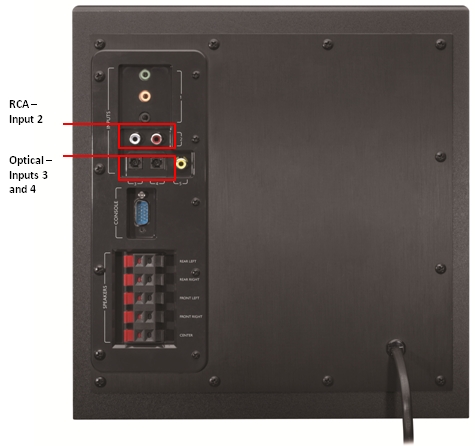
Connect the optical cable between your Z906 and the game console. (NOTE: You can use either input 3 or 4 as they are both optical.)
-
Press the Input button on the front of the Control Console to match the optical input you connected to your game console.
Both the original Playstation and Nintendo Wii use RCA connections to output audio.
To configure your Z906 for surround sound with these game consoles:
-
Connect the RCA cable between the Z906 and game console.
-
Press the Input button on the front of the Control Console until the light cycles to Input 2 (RCA).
Important Notice: The Firmware Update Tool is no longer supported or maintained by Logitech. We highly recommend using Logi Options+ for your supported Logitech devices. We are here to assist you during this transition.
Important Notice: The Logitech Preference Manager is no longer supported or maintained by Logitech. We highly recommend using Logi Options+ for your supported Logitech devices. We are here to assist you during this transition.
Important Notice: The Logitech Control Center is no longer supported or maintained by Logitech. We highly recommend using Logi Options+ for your supported Logitech devices. We are here to assist you during this transition.
Important Notice: The Logitech Connection Utility is no longer supported or maintained by Logitech. We highly recommend using Logi Options+ for your supported Logitech devices. We are here to assist you during this transition.
Important Notice: The Unifying Software is no longer supported or maintained by Logitech. We highly recommend using Logi Options+ for your supported Logitech devices. We are here to assist you during this transition.
Important Notice: The SetPoint software is no longer supported or maintained by Logitech. We highly recommend using Logi Options+ for your supported Logitech devices. We are here to assist you during this transition.
Frequently Asked Questions
There are no products available for this section
There are no Downloads for this Product
There are no Downloads for this Version
Compatible Product
